
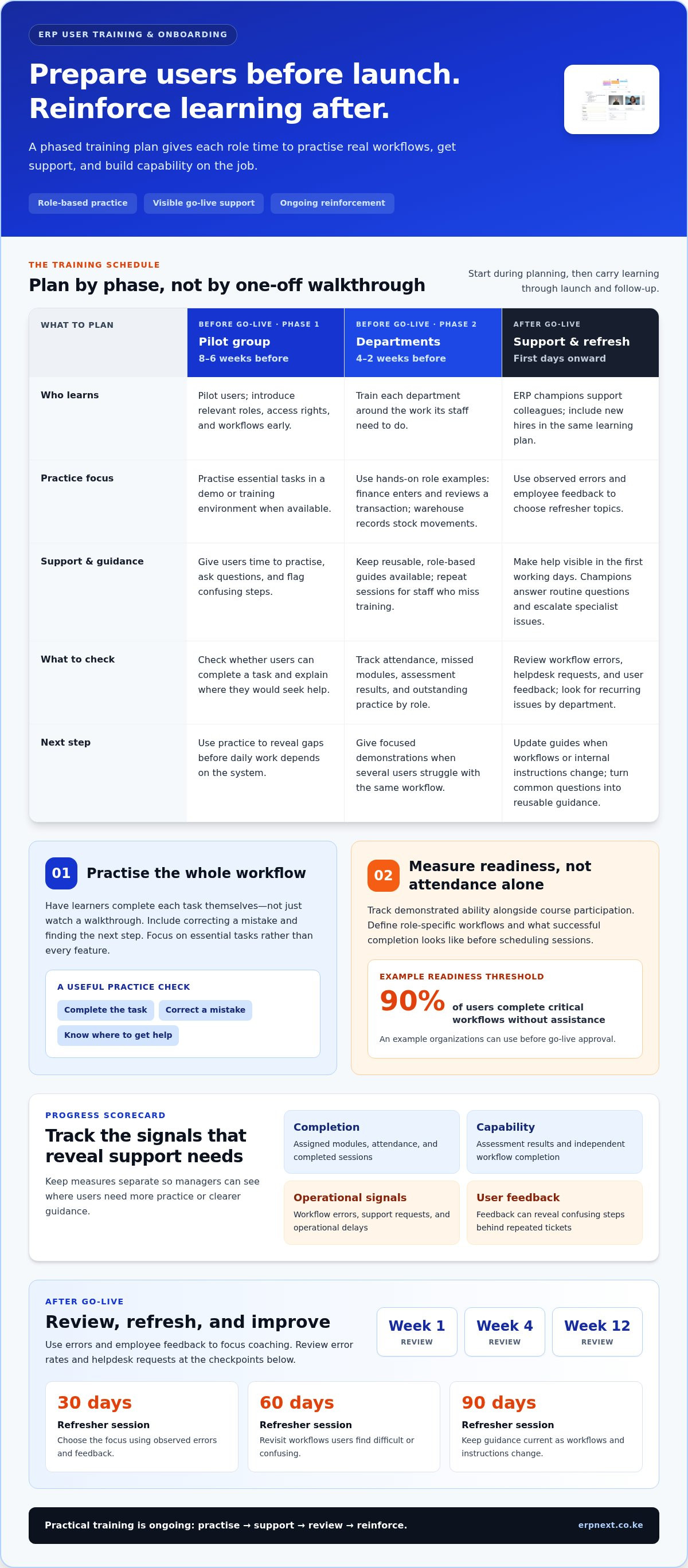
Prepare staff for ERP user training and onboarding during the planning phase, not just before launch. A practical schedule starts pilot-group training eight to six weeks before go-live, followed by department-by-department training four to two weeks before go-live. Reinforce learning with practice and support after launch.
One walkthrough rarely prepares everyone. Staff need time to practise their daily workflows, ask questions, and return to clear guidance when they need it. Without that support, repeated questions and avoidable errors can take time away from their core work.
This guide explains how to make training practical for small manufacturers and other teams, prepare managers and ERP champions to support change, and track progress through completion, errors, and help requests. You’ll also learn to create reusable, role-based materials and a follow-up plan that supports both new and experienced users after go-live.
Key Takeaways
- Start training during planning, then phase it from pilot users to departments before go-live.
- Build role-based practice around the real workflows staff need to complete, not a tour of every feature.
- Use ERP champions, reusable guides, and post-launch support to reduce repeated questions and help users solve routine issues.
- Track completion, workflow errors, support requests, and user feedback to spot where teams need more help.
- Review error rates at weeks 1, 4, and 12 after go-live to guide timely refreshers and improve adoption.
How Does Change Management Support ERP Staff Training?
Onboard users by assigning role-based access, training them before launch, practising real workflows, supporting go-live, and reinforcing learning afterward. These steps help each department build practical confidence while managers track outcomes and address barriers to adoption.
-
Start Training Before Go-Live
Start during planning and schedule learning around the launch date. A strong ERP user training and onboarding plan begins with pilot-group training eight to six weeks before go-live, followed by department-by-department training four to two weeks before go-live. Users then have time to practise, ask questions, and flag confusing steps before daily work depends on them.
Avoid squeezing preparation into a one-day group walkthrough during the week before launch. Introduce relevant roles, access rights, and workflows early. According to the Food and Agriculture Organization of the United Nations, ERP training should be structured by role, with training for senior managers, advanced technical training for key users, and ongoing training for end users.
-
Practice Workflows Hands-On
Give each role practical exercises that reflect its regular work. A finance employee might enter and review a transaction, while a warehouse employee practises recording stock movements. Use a demo or training environment early when available, so practice does not affect live records. Focus scenarios on essential tasks rather than every feature in the enterprise software.
Have learners complete each workflow themselves, including correcting a mistake and finding the next step. Hands-on exercises give them a safe way to learn from errors. Check whether users can finish the task and explain where they would seek help. This reveals gaps before they lead to errors or internal support requests.
-
Provide Go-Live Hand-Holding
Arrange visible support for the first working days after launch. ERP champions can answer routine questions, help colleagues troubleshoot, and escalate issues that need specialist attention. Give staff a clear way to report a blocked task, including the workflow affected, what happened, and where they got stuck.
During the first four weeks after go-live, track helpdesk tickets, workflow errors, and user feedback. Review recurring issues by department instead of treating every question as isolated. If several users struggle with the same approval step, provide a focused demonstration and update the guide. This targeted response helps work continue and reduces avoidable dependence on support.
-
Reinforce Learning After Go-Live
Schedule refresher sessions at 30, 60, and 90 days after launch. Use observed errors and employee feedback to choose each session’s focus, such as a frequently misunderstood handover. Keep guides available for repeat reference, and update them when workflows or internal instructions change.
Treat ERP user training and onboarding as an ongoing process. Ask champions to collect questions and identify patterns, then turn common answers into reusable guidance. Include new hires in the same learning plan. Regular reinforcement helps users solve routine problems independently, while managers can use support requests and workflow errors to focus further coaching.
Training progress analytics and certification tracking
ERP user training and onboarding can take a couple of weeks or as much as a couple of years, depending on role complexity, workflow practice, and prior experience. Track demonstrated ability as well as attendance so managers can judge whether employees are ready for their actual tasks.
- Set role-based measures. Before scheduling sessions, list the workflows each user must perform and define what successful completion looks like. A manager might review an approval, while a new employee enters and submits a transaction. Track completion, workflow errors, support requests, operational delays, and user satisfaction separately.
Use these measures to distinguish course participation from practical readiness. A completed session doesn’t show whether someone can finish a task independently. For example, 90 percent of users completing critical workflows without assistance is a readiness threshold organizations can use before go-live approval.
- Schedule training around shifts. Map each department’s working patterns before assigning sessions, then repeat sessions for employees who cannot attend. Record attendance and missed modules by role, not just by team. This makes gaps visible without pulling an entire shift away from daily operations.
Use short sessions for specific workflows, followed by practice. If warehouse employees work different shifts, give each group the same exercise and assessment. Keep records consistent so managers can compare readiness across sessions and identify where employees need more instruction.
- Track onboarding milestones. Use a dashboard or shared tracker to show assigned modules, completed sessions, assessment results, and outstanding practice. ERP dashboards can track onboarding steps and help managers spot delays. Review records regularly and assign an owner to each overdue task.
For new hires, use a role-specific checklist covering account access, relevant modules, training, and workflow practice. An LMS can manage role-based learning paths, assessments, certifications, and audit documentation. These records show each employee’s progress and make incomplete requirements clear to managers.
- Measure capability after launch. Compare role-based error rates and helpdesk requests at weeks 1, 4, and 12 after go-live. Pair those figures with employee feedback, since repeated tickets may point to confusing instructions. Use the pattern to plan a refresher session for the workflow causing difficulty.
Tie certification records to specific skills, such as submitting a transaction or completing an approval. Assess task performance rather than attendance alone. Managers can then identify who needs coaching and which training materials need revision.
- Review onboarding as a process. Track how employees move through assigned milestones, where steps are delayed, and which tasks remain incomplete. Use the findings to adjust session timing, clarify ownership, and improve instructions. Customer onboarding programmes also benefit from visible stages, assigned task owners, and progress updates.
Review ERP user training and onboarding records during manager check-ins, then share relevant progress with employees. Connect each measure to the task staff must perform, so the tracker informs practical decisions instead of becoming a reporting exercise. For a clearer view of relevant workflows, explore ERP platform workflows.
Why Is ERP End-User Training Important?
End-user training helps employees use an ERP system effectively from their first day. In Kenya, prepare staff to protect personal and business information with role-based access, careful credential handling, and clear steps for reporting accidental disclosure.
- Map each onboarding process before automating it. List the tasks, owners, inputs, and deadlines for a new employee’s first day, first week, and first month. For example, a manager may request system access, IT may assign approved modules, and finance may explain a required approval workflow.
Then configure the ERP workflow to route those tasks to the right team without manual follow-up. Automated reminders can flag overdue steps, but only after owners and due dates are clear. A system cannot fix an undefined process, so document the correct sequence before building task routes.
- Prepare clean data and usable learning materials. Review employee names, roles, department assignments, and access needs before loading records. Correct duplicates and outdated entries, then use realistic practice examples that do not expose live personal information. For instance, a new sales employee needs guidance on the customer records and approvals relevant to the role.
Pair each workflow with a short guide showing required fields, decision points, and the next step. Make the guide match the actual process, not an idealised version. Clean data and task-specific learning materials help employees practise accurately and support productivity from the start.
- Set process governance and data rules. Assign an owner to each workflow, such as a finance lead for expense approvals or an HR lead for employee onboarding. Define who can view, enter, edit, and approve each record. Teach users not to share credentials and to report misdirected information through the organisation’s internal process.
Structured training also supports delivery goals. According to Deloitte, organisations with structured ERP training programmes are 60% more likely to meet implementation goals on time and within budget. Reinforce the approved process with examples, such as showing staff which fields must be checked before submitting an employee record.
- Scale onboarding with repeatable templates. Create a standard checklist for each role, then tailor modules and guides to the employee’s department. ERP workflows can route onboarding tasks to teams such as IT and finance without manual input. This gives managers a consistent view of assigned access, completed learning, and pending approvals.
For example, a new finance employee can receive finance-specific tasks while a warehouse employee receives relevant inventory steps. Keep shared requirements consistent, but avoid assigning training or access unrelated to each person’s work. A repeatable structure makes it easier to onboard more teams without rebuilding the process each time.
- Review deadlines and completion records. Track each assigned task’s owner, due date, completion status, and any blocked step. If an access request misses its deadline, managers can see whether the delay sits with the requester, approver, or IT team. Use the record to address the bottleneck instead of sending repeated general reminders.
Review the checklist with the employee and manager at the end of the first week and first month. Confirm that required workflows work in practice, not just in training. This final check connects onboarding tasks, learning, and access controls to the employee’s actual responsibilities.
Training should teach staff to protect personal and business information through role-based access, careful credential handling, and prompt reporting of accidental or misdirected disclosures. Explain who may view, enter, edit, and approve each record, and use practice examples that do not expose live personal information.
Hidden costs of staff time and repeated workflow questions
Combine instructor-led sessions, e-learning, and hands-on practice, since each supports a different part of learning. Structure the plan by role and access rights, and give every employee task-based guides with workflow steps, examples, common errors, and an escalation route.
-
Assess Training Needs and Map Workflows
Start by listing the workflows each role must complete, then map every step, decision, and handover. Ask employees and managers which tasks currently trigger questions, such as submitting a purchase request or correcting an entry. Compare these needs with each user’s access rights so training covers relevant work without teaching restricted processes.
Use the map to set training priorities. For example, if new staff repeatedly ask how to complete an approval, document the exact sequence and decision points. Ten ERP users each spending 20 minutes a week looking up workflows or asking for help lose more than 170 hours a year collectively. Record repeat questions to locate the workflow gaps driving that time loss.
-
Practice Workflows with Real Configurations
Build practice exercises around the system’s actual roles, fields, and approval routes. Have employees complete realistic tasks, review the result, and correct an intentional mistake. According to the Európai Unió, hands-on exercises let learners make mistakes and learn from them. Keep practice data separate from live business records.
Choose a mixed learning format for each workflow: an instructor can explain decision rules, e-learning can refresh standard steps, and practical exercises can test execution. For example, a supervisor might demonstrate an approval before users practise it themselves. Check that each exercise matches the configured process. Generic screenshots can teach the wrong route when system settings differ.
Keep workflow instructions separate from data reporting. A guide should explain how to enter or approve a record; a report should show what the recorded data means. If employees confuse the two, they may repeatedly ask for task instructions while managers need separate guidance to interpret results.
-
Provide Documentation-Based Workflow Help
Organise approved product documentation around the questions employees ask while working. A documentation assistant such as Paxy AI can surface relevant guidance from those materials. Keep its answers tied to approved instructions and check them against the configured workflow. Do not use generated guidance instead of validating a critical transaction.
Make each guide answer a specific task question: where to begin, what information to enter, what happens next, and how to resolve a common error. For an approval workflow, include required fields, the reviewer’s action, and the route for an exception. Update instructions when the process changes, and direct employees to the current version rather than circulating outdated notes.
Invite users to flag missing steps during practice and after launch. Group questions by workflow, update the relevant documentation, and use recurring issues to plan focused coaching. This keeps guidance practical, reduces repeated explanations, and helps employees complete routine tasks independently with greater confidence.
Formal ERP training for small manufacturers
For a small manufacturer, training should connect ERP implementation to the production tasks staff perform. A clear role-based plan helps employees practise the right processes without taking an entire team away from daily operations.
- Separate training by role. List the decisions and tasks each user handles, from recording materials to reviewing production information. A supervisor, production planner, and storekeeper need different learning paths because their ERP access and responsibilities differ.
According to the Food and Agriculture Organization of the United Nations, ERP training should include training for senior managers, advanced technical training for key users, and ongoing training for end users. Use this structure to assign responsibilities: managers guide process decisions, key users support system tasks, and end users practise their regular workflows.
- Start with production scenarios. Build lessons around familiar tasks, such as recording material usage, checking a job’s progress, or reporting a completed step. Connect each exercise to the business process it supports, so users understand what information to enter and who uses it next.
For manufacturers with 10 to 50+ employees, coordinating learning alongside operational work can be especially demanding. Schedule sessions around production responsibilities, and train a small group of key users to reinforce instructions on the shop floor. Avoid taking every worker away from a live process at once.
- Offer more than a course. Combine instructor-led sessions, self-paced videos, quick-reference guides, and on-the-floor coaching. A course can introduce a process, while a concise guide helps staff revisit specific steps at work. Practical coaching lets a trainer answer questions where the task happens.
Give each employee access to a demo or training environment when available. A 15-minute exploration of an ERP interface may help end users understand its functionality better than hours of courses or one-to-one coaching. Follow that exploration with a task, so familiarity becomes practical capability.
- Test for task readiness. Ask learners to complete a realistic workflow and explain the next handover. For example, a storekeeper can practise recording material usage while a supervisor checks whether the production record reflects the completed work.
Use errors and questions to improve the lesson, not to label the employee. If users repeatedly miss a field, explain its purpose in the guide and demonstrate its effect on the next process step. This feedback loop strengthens adoption and makes future sessions faster to deliver.
- Keep training active after launch. Assign key users to collect recurring questions, maintain quick-reference guides, and flag process changes. Include new employees in the same role-based learning path instead of relying on informal explanations from busy colleagues.
Turn your manufacturing training plan into a practical ERP rollout. Explore ERPNext for manufacturing and connect system workflows with the processes your team needs to learn.
TSEA - ERPNext: ERPNext
TSEA - ERPNext offers ERPNext for businesses aligning staff training with their operational workflows. Turn to it when your team needs an all-in-one business management platform to support more coordinated processes, or when you are planning ERP adoption and want training to reflect the system employees will use.
For sector-specific operations, TSEA - ERPNext also offers Pharmacy Chain Management and Hospitality solutions. Map staff roles and daily tasks first, then use those workflows to shape practical onboarding and learning materials. This keeps preparation focused on the work your team needs to complete.
Explore how ERPNext can support your organisation’s processes, or contact TSEA - ERPNext to discuss your requirements.
Make ERP Learning Part of Everyday Operations
Give ERP learning a lasting place in your operating plan. Assign an owner to keep training aligned with changing responsibilities, process updates, and staff questions. That way, new workflows become part of how teams operate rather than a one-off project task.
Make the next step a practical conversation about the system your people need to use. TSEA - ERPNext offers ERPNext, Pharmacy Chain Management, and Hospitality solutions. Connect your team’s training priorities to the workflows these offerings support, and plan how staff will learn and apply each process in daily work.
Ready to discuss a suitable next step? Contact TSEA - ERPNext to explore how ERPNext can support your organisation’s operations. With a clear learning plan and the right system fit, your team can move forward with purpose and confidence.
Frequently Asked Questions
Can I learn ERP on my own?
Yes, you can learn basic ERP navigation independently with a practice environment and system documentation. Start with a task relevant to your role, such as locating a customer record or reviewing a purchase request. Then repeat it without the guide. Self-study is useful for familiarisation, but ask a manager or key user to review tasks involving approvals, shared records, or decisions that affect other departments.
How Do You Deliver Tailored and Customized ERP Training?
Tailor training by matching each session to a role, its access, and its routine decisions. A sales employee could practise updating a customer record, while a supervisor could review an approval queue. Use the organisation’s terminology and realistic scenarios, then let users practise the process themselves. After each session, collect participants’ questions and adjust examples or instructions where users interpret the same task differently.
How Do You Identify Who Needs ERP Training?
Identify training needs by comparing each employee’s job tasks with the ERP processes they must perform. Include staff who enter, review, approve, or rely on the same information, even if they use different screens. Ask managers to flag changed responsibilities, then observe employees completing representative tasks. Someone who can explain a process but struggles to complete it independently needs practical coaching, not just another overview.
What Is ERP Training and Why Does It Matter?
ERP training teaches employees to complete their work using an organisation’s enterprise resource planning system. It matters because the same record may pass between teams, and an incorrect entry can create extra work downstream. For example, staff entering a supplier invoice need to know the required fields and the next review step. Training clarifies these actions and helps users follow a consistent process instead of relying on informal workarounds.
What Is Process-Based ERP Training and Why Is It More Effective?
Process-based ERP training teaches a complete business task from start to handover, rather than presenting software features one by one. For example, teach a purchase request as a sequence: create it, submit it, review its status, and respond if it is returned. This helps employees connect screen actions with their responsibilities and understand what another team needs next.
How can organizations assess ERP user readiness and training effectiveness?
Assess readiness by asking employees to complete role-relevant tasks without prompts, then record where they pause, make errors, or request help. For example, give a user a sample transaction and ask them to find its status afterward. Compare results across roles and departments, then repeat the exercise after targeted coaching. Completion records show participation; observed task performance shows whether training has built usable skills.
What are common ERP adoption challenges and how can user resistance be reduced?
Common adoption challenges include unclear process changes, unfamiliar terminology, access that does not match responsibilities, and fear of making mistakes. Reduce resistance by explaining what changes for each role and showing how the new process handles a familiar task. Invite employees to test scenarios and flag confusing steps. Respond by clarifying instructions or correcting the process, so feedback leads to practical improvements.
What support should users receive after ERP go-live?
After go-live, users need an easy way to report a blocked task, current instructions for common workflows, and access to someone who can help distinguish a user question from a system issue. For example, a support log can capture the task, screen, and point of difficulty. Review recurring questions with the relevant team, update guidance, and offer focused coaching when the same problem returns.


