
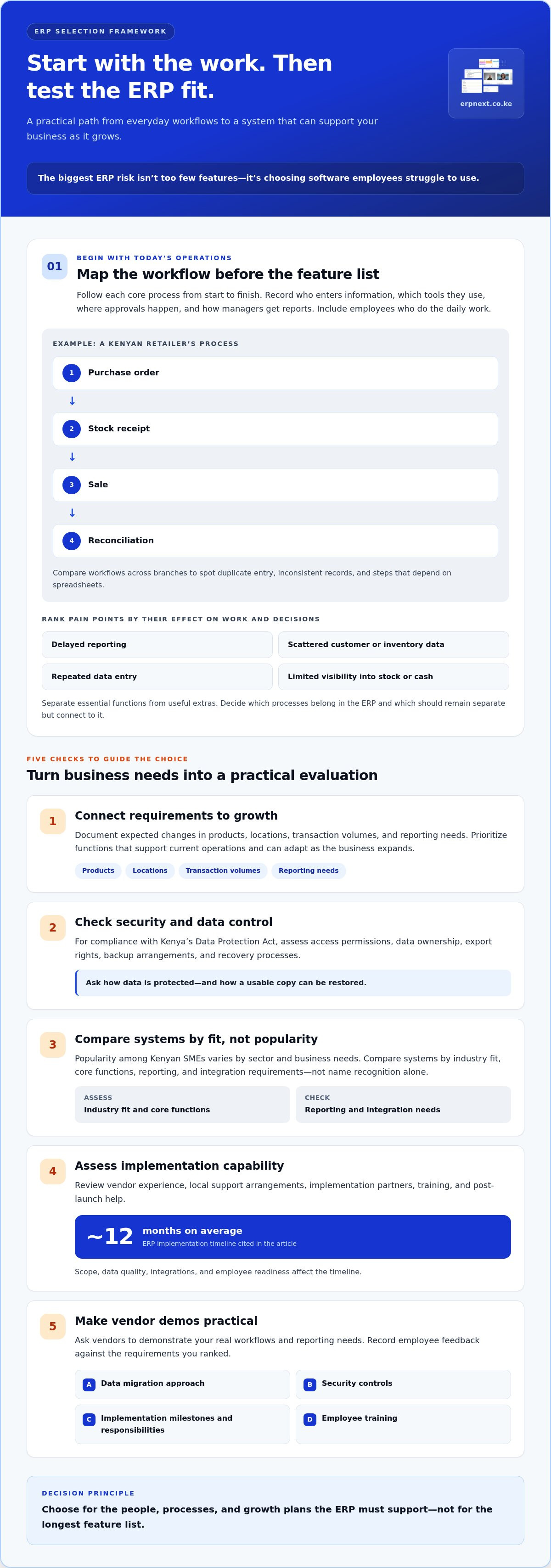
The biggest ERP risk isn’t choosing a system with too few features, it’s choosing one employees struggle to use. Knowing how to choose ERP software starts with the people who’ll use it every day, then matches the system to your business needs, growth plans, existing tools, and budget. Employee support and practical training matter: even capable software can disrupt work if teams can’t adopt it.
Look beyond the feature list. A poor fit can mean extra work, costly customization, integration problems, and a system that holds growth back. Assess employee needs, map essential processes, compare scalability and integrations, and weigh costs and implementation risks before deciding. This gives you a practical framework for choosing ERP that supports your business now and can adapt as it grows.
Key Takeaways
- Map the workflow bottlenecks and reporting gaps that matter most, and involve employees who will use the system every day.
- Choose a platform that can adapt as your operations expand, without relying on excessive customisation to meet future needs.
- Identify which existing tools must connect to the ERP and how information should move between them.
- Look beyond the initial software cost: account for implementation, data migration, training, integration, and ongoing support when weighing risk.
Assessing business processes, pain points, and growth plans
Start with the work your teams do today, not an ERP feature list. These steps connect current workflows, employee needs, and future priorities.
Review Current Processes and Workflows
Map each core process from start to finish, such as a Kenyan retailer’s purchase order, stock receipt, sale, and reconciliation. Record who enters information, which tools they use, where approvals happen, and how managers get reports. Include employees who perform the daily work, not only department heads. Compare workflows across branches to spot duplicate entry, inconsistent records, and steps that depend on spreadsheets.
Identify ERP Needs and Business Pain Points
List the operational problems an ERP must address, then rank them by their effect on work and decisions. Examples include delayed reporting, scattered customer or inventory data, repeated data entry, and limited visibility into stock or cash. Separate essential functions from useful extras. Note which processes should move into the ERP and which should remain separate but connect to it.
- Connect requirements to growth. Document expected changes in products, locations, transaction volumes, and reporting needs. Choose functions that support current operations and can adapt as the business expands.
- Address security and data control. For compliance with Kenya’s Data Protection Act, assess access permissions, data ownership, export rights, backup arrangements, and recovery processes. Ask how data is protected and how a usable copy can be restored.
- Compare suitable systems. Popularity among Kenyan SMEs varies by sector and business needs, so compare ERP systems by industry fit, core functions, reporting, and integration requirements rather than name recognition alone.
- Assess implementation capability. Review vendor experience, local support arrangements, implementation partners, training, and post-launch help. ERP implementations take around 12 months on average; scope, data quality, integrations, and employee readiness affect the timeline.
- Make demos practical. Ask vendors to demonstrate your real workflows, reporting needs, data migration approach, security controls, implementation milestones, responsibilities, and training. Record employee feedback against the requirements you ranked.
Is it scalable for future growth?
Evaluate whether the ERP can expand with your operations, not just handle today’s workload. Check its capacity for growth, flexibility, and the long-term cost of customization before choosing a system.
-
Assess Future Growth Needs
Map expected changes, such as adding branches, users, product lines, or sales channels. For example, a retailer opening another location needs consistent stock visibility and reporting across branches. Identify the ERP functions that support this change and separate likely requirements from speculative features. This gives vendors a clear growth scenario to demonstrate.
-
Evaluate Scalability and Flexibility
Ask how the ERP can accommodate more users, modules, and features as your business expands. Compare the steps involved in increasing capacity or adding a function, then test those actions in a demonstration. Cloud-based ERP typically offers easier scalability and lower upfront costs than on-premises systems, while deployment choice should also reflect performance, accessibility, security, and ownership needs.
- Test performance during realistic peak periods, not only on an ordinary workday. A distributor, for example, can model a busy ordering period and see whether staff can process sales while managers review inventory. Ask how the system handles more transactions and users, and what happens when demand rises. Scalability should support growth without slowing essential workflows.
- Keep customization focused on genuine business needs. Extensive changes can create long-term maintenance challenges, so first see whether a workflow can use standard ERP functions. For each requested change, record its business purpose and how it could affect future upgrades. This helps preserve flexibility and avoid a system that becomes difficult to maintain.
- Compare your growth scenarios against the platform’s available capabilities and expansion options. Reviewing ERP platform capabilities can help you connect today’s operational priorities with future requirements.
Does it integrate with your existing systems?
Compare how the ERP connects with your current software and workflows, and whether its functions suit your industry. Check the deployment model too: cloud ERP is hosted and accessed online, while on-premises ERP runs on company servers and is managed in-house. A hybrid system combines both approaches.
-
Review Existing Software Integrations
List every application that must exchange information with the ERP, such as CRM, accounting software, or an e-commerce platform. For each connection, map what data moves, which system owns it, and how often it needs updating. Ask about tested integration methods or connectors and relevant implementation experience. Test a real workflow, such as an online order updating stock records, rather than relying on a feature list.
-
Compare Industry-Specific Integrations and Modules
Match modules to your sector’s actual processes. A retailer may need inventory and order management, while a manufacturer may prioritize production planning and stock control. Industry-specific ERP functions can address sector practices and operational complexity. Compare the functions employees need with the information they use daily. Don’t focus only on module count: assess whether each module supports a defined workflow and produces useful insights.
- Compare usability and customization alongside features. Give employees a representative task, such as recording a sale or checking an inventory report, then note the steps and handoffs required. Check whether standard functions meet the need before requesting customization. Custom changes can affect maintenance, so link each request to a business requirement and consider the impact on upgrades and integrations.
- Test the full information journey, not just whether two systems connect. For example, trace a customer order from entry through fulfilment, stock updates, and reporting. Check how the system flags errors, who resolves them, and whether employees must re-enter data. Smooth integration should reduce duplicate work and give teams consistent information for decisions.
- Document integration ownership before implementation begins. Record the systems involved, data fields, update timing, responsible teams, and expected outcomes. Include these details in the implementation scope and test them with representative workflows. For a practical starting point, ERP integration planning can help frame the connections your business needs.
Costs and risks of choosing the wrong ERP
Assess migration, integration, training, and change-management risks before committing. A pharmacy chain, for example, could face disruption if inventory records transfer inaccurately or employees aren’t prepared for new workflows.
-
Consider the Costs of a Wrong ERP Choice
Build a total-cost view covering software licensing, implementation, training, customisation, integration, ongoing support, maintenance, and upgrades. Compare those costs over a five-to-ten-year period, not just the initial purchase. A system that needs extensive changes or separate workarounds can add expense and slow daily operations. Set a clear project scope before design approval, then track requested changes against it.
-
Assess Migration and Integration Risks
Inventory each data source and integration before migration begins. Check for duplicate customer records, inconsistent product codes, and outdated inventory figures, then clean and test sample data. Verify migrated records against the source system and test connected workflows, such as an order updating stock and reporting correctly. Assign owners to resolve errors and document how teams will handle exceptions during implementation.
-
Account for Training and Change-Management Risks
Plan training around real employee tasks, not generic software tours. A sales employee might practise entering an order, while a stock team member checks inventory updates. Give affected teams time to test workflows and raise issues before launch. Without clear process guidance and support, employees may return to spreadsheets, weakening automation and creating conflicting records across departments.
- Measure risk through practical checkpoints: data accuracy, integration tests, training completion, and readiness to use the new workflows. Compare project spending and scope against the approved plan at each milestone. For pharmacy operations, consider how Pharmacy Chain Management fits the processes and records your team needs to manage.
TSEA - ERPNext: ERPNext
TSEA - ERPNext is a natural next step if your requirements point to an integrated business management platform. ERPNext can be considered alongside your workflow, growth, integration, and employee-adoption priorities, so you can assess its fit against the needs mapped during your selection process.
For pharmacy businesses, Pharmacy Chain Management is a relevant offering to explore; Hospitality is available for hospitality operations. Bring your priority processes and key integration needs into the discussion, then compare them with the functions you need today and expect to use as the business grows. This keeps the conversation practical and focused on operational fit.
Contact TSEA - ERPNext to discuss your ERP requirements and next steps.
Turn Your ERP Decision Into a Confident Next Step
To decide how to choose ERP software, turn your selection criteria into a short decision record. Capture the business outcomes you want, the workflows the system must support, and the risks your team needs to manage. Assign an internal owner to keep priorities clear and bring decision-makers together around the same requirements.
Then move from comparison to a focused conversation about fit. Share your operational priorities and discuss how ERPNext could support them with TSEA - ERPNext. A practical discussion can help connect your selection work to the next stage of planning, without losing sight of employee needs or the way your business operates.
Explore ERP options with TSEA - ERPNext and take the next step toward a system that supports your direction. With clear priorities and the right people involved, you can move forward with confidence.
Frequently Asked Questions
Does it have end-user (employee) support?
Yes, employee support should be part of your ERP decision, not an afterthought. Look for onboarding guidance, role-based training, practical help resources, and a clear way to report issues. For example, have a cashier and a stock controller try common tasks during a demonstration. Their feedback can reveal confusing screens or unclear steps that managers may overlook.
First of all: what is ERP?
ERP stands for enterprise resource planning: software that brings key business operations together in one system. Depending on the platform, this can include accounting, sales, purchasing, inventory, and human resources. Instead of maintaining separate records in disconnected tools, teams can work with shared information. Businesses use ERP to coordinate activities and keep operational data more consistent.
How does ERP software work?
ERP software connects business functions through shared records and workflows. For example, when a team records a purchase, the system can use that information in purchasing and inventory processes, then make it available for relevant reports. Employees work with the functions assigned to their roles, while managers use shared data to monitor activity. The precise workflow depends on the system’s configuration.
How much does it cost?
ERP cost depends on the scope of the project and the capabilities your business needs. Factors include software licensing, implementation, data migration, integrations, training, customisation, and ongoing maintenance or support. For a specific ERP project, the price depends on the case and is provided after a quote request. Define the required functions and deployment needs first to make options easier to compare.
How to choose the best ERP software?
To decide how to choose ERP software, score each option against your must-have workflows, usability, integrations, growth needs, and implementation plan. Then run a realistic acceptance test: ask employees to complete representative tasks and record whether the results meet your requirements. A strong choice fits the business and can be adopted in practice, not simply the system with the longest feature list.
Is cost the most important factor when selecting an ERP?
No, purchase cost alone doesn’t show whether an ERP is the right fit. A lower initial outlay may be offset by extra customization, manual workarounds, or difficult integrations. Compare the full cost of ownership with the system’s ability to support essential workflows and employee adoption. A platform that handles a critical process clearly may deliver better operational value than a cheaper, poorly matched option.


