
An ERP rollout is more than installing software: it brings data, processes, people and connected systems into one coordinated business platform. Most ERP implementation projects take between 60 and 120 days, with the schedule shaped by the organisation’s size and complexity. ERP implementation services typically cover process advice, data preparation and migration, system configuration, testing, project management and integration.
It’s easy to focus on the software and underestimate the work around it. Clean, well-mapped data and processes that reflect how teams operate are central to making an ERP useful across departments. Integration can also bring information together, giving teams shared visibility and helping them make timely decisions.
This article explains each stage, from assessing workflows and preparing records to configuring the ERP, testing it against business requirements, and connecting it with other systems. You’ll also learn what affects the project timeline, how to prepare teams for change, and how to treat implementation as a practical business transition, not just a technology setup.
Key Takeaways
- Start data migration by identifying what information teams need, removing duplicates and mapping records to the new system.
- Assess current workflows before configuration so the ERP supports business processes and goals.
- Plan ownership, resources, risks and change management alongside the technical work to keep implementation on track.
- Build testing around approved requirements, then resolve issues before users rely on the system.
- Map how departments and connected systems will share information to improve collaboration and visibility.
Data analysis, preparation, and migration
A payroll export, stock register, and customer file may contain overlapping records. Data analysis identifies what the new ERP needs, where information is stored, and how migration can preserve useful business history.
Data Strategy and Migration Planning
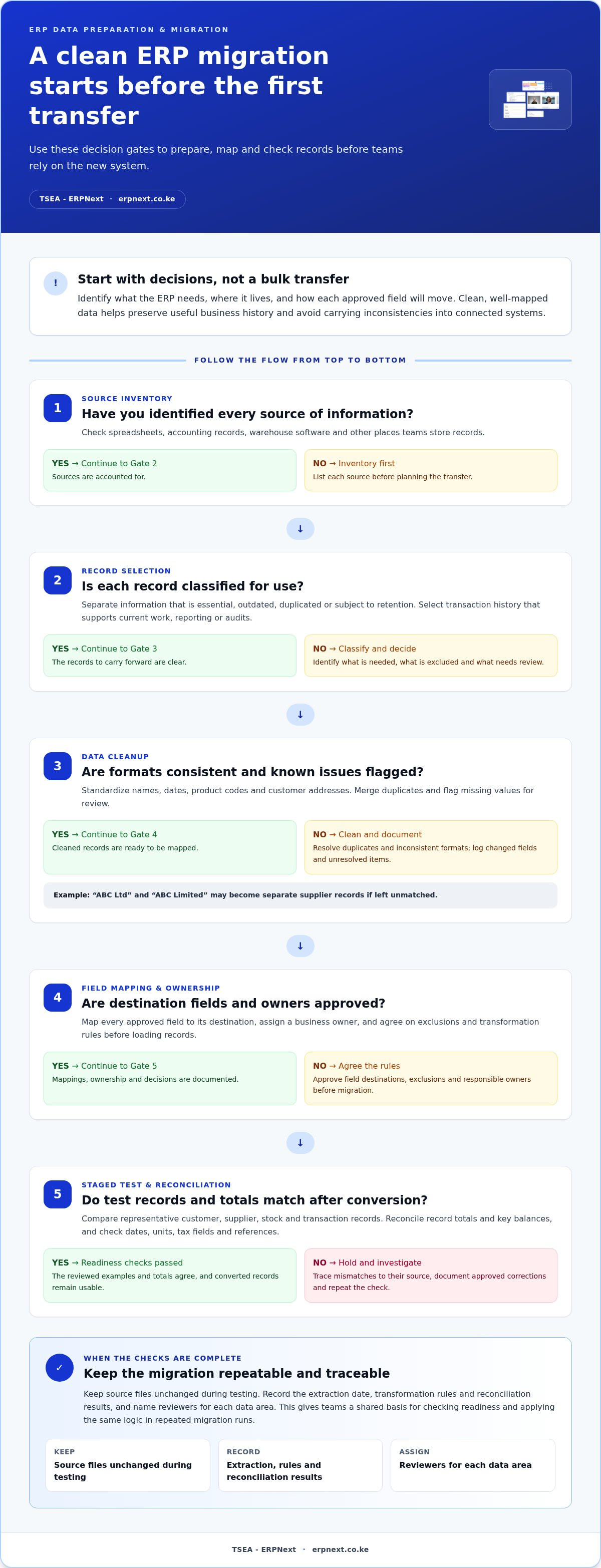
ERP implementation services should begin with a data strategy, not a bulk transfer. Inventory every source, such as spreadsheets, accounting records, and warehouse software. Classify information as essential, outdated, duplicated, or subject to retention. Map each approved field to its destination, assign a business owner, and plan extraction, transformation, loading, and review. This gives teams clear decisions to make before migration starts.
Prepare data with practical checks. Standardize names, dates, product codes, and customer addresses; merge duplicates; and flag missing values for review. For example, a supplier listed as “ABC Ltd” in one file and “ABC Limited” in another may become two records after transfer. Keep a decision log of changed fields, exclusions, and unresolved items. This helps teams trace errors to their source instead of correcting records blindly.
Legacy ERP Data Migration
Moving from a legacy ERP requires mapping old fields to the new system’s structure. A former product code may not match the new inventory code, so retain a cross-reference during conversion. Identify which transaction history supports current work, reporting, or audits, then select records accordingly. A staged extraction lets teams compare representative customer, supplier, stock, and transaction records before transferring everything.
Protect data integrity through reconciliation, not assumptions. Compare record totals and key balances between the source and destination, then investigate mismatches. Test examples such as an open supplier invoice, a customer account, and an item with stock movements. Check that dates, units, tax fields, and references remain usable after conversion. Keep source files unchanged during testing, and document approved corrections so repeated migration runs apply the same logic.
Once records are clean and mapped, ERP integration can bring information from different departments together, creating a single source of truth and supporting real-time analytics. Connected purchasing and inventory records, for example, can show how a supplier order relates to stock availability. Define which system owns each data field, how updates move, and who handles exceptions. Without clear ownership, integration can reproduce inconsistencies instead of resolving them.
- Profile source data to find duplicates, gaps, and inconsistent formats.
- Approve field mappings and exclusions before loading records.
- Reconcile converted examples and totals before teams use the new system.
Plan a repeatable migration run and name reviewers for each data area. Record the extraction date, transformation rules, and reconciliation results. This gives finance, operations, and customer-facing teams a shared basis for checking readiness. Clean, traceable data helps the ERP support dependable workflows and useful analysis from the start.
Application consulting and business-process advice
ERP application consulting connects software choices to how your teams actually work. An assessment can identify inefficient handoffs and recommend process changes aligned with business goals.
Business Process Assessment and Redesign
Trace a real task from its first request to completion. For a purchase, map who requests an item, approves it, orders it, receives it, and records the invoice. Note repeated data entry, waiting points, and unclear ownership. Decide which steps need to change before configuring the ERP. This keeps the future workflow clear instead of simply digitizing existing delays.
Compare the current process with the desired one using practical measures, such as approval steps, rework, and missing information. A redesign might route purchase requests to the right approver and capture required details at entry. Document the new sequence and assign responsibility at each handoff. This gives project teams a usable basis for system decisions and staff guidance.
ERP Process Analysis and Optimization
Process analysis checks whether proposed ERP workflows support daily decisions. For example, trace a sales order from quotation through fulfilment and invoicing. Check whether each role can see the information needed for its next action. This can reveal access gaps, unnecessary approvals, and conflicting records before configuration makes them harder to fix.
Prioritize improvements by their effect on business goals, not by the number of software features. A review might simplify an approval route while preserving necessary management control. Record the reason for each change, its owner, and its expected operational effect. These decisions make optimization specific and give teams a clear way to assess whether the revised process works.
Process Automation and Operational Efficiency
Automation can handle repeatable steps, such as routing a complete purchase request to an approver. It works best when the process has clear inputs, decision rules, and exception handling. If supplier details are incomplete, for example, the workflow should return the request for correction rather than pass faulty information forward. Define these rules before automating the task.
Measure efficiency through the work itself: repeated data entry, avoidable waiting, and corrections caused by missing fields. These observations help distinguish a process problem from a software problem. Automating a confusing workflow can reproduce the confusion faster. First simplify the steps, then configure the system to support the agreed process and make exceptions visible to the right team.
ERP Application Consulting
Choose ERP implementation services by assessing platform knowledge, the approach to process consulting, and how clearly the provider explains the path from requirements to configured workflows. Ask for a clear account of responsibilities, decisions, and testing against your actual business processes. For an ERP project in Kenya, platform expertise and project scope are key considerations when selecting an implementation partner.
Consulting should connect business needs to practical application choices, including roles, approvals, and reporting. A partner can facilitate workshops with users from finance, operations, sales, and management, then document decisions and unresolved process issues. For a structured starting point, use ERP process planning to frame the workflows and requirements your teams need to discuss.
- Map a real workflow before changing it.
- Prioritise process improvements against business goals.
- Define automation rules and exception paths before configuration.
- Evaluate a partner’s consulting method, platform knowledge, and project responsibilities.
ERP implementation project management
For an ERP in Kenya, define the tax treatments and eTIMS invoice and record workflows your organization needs, then include them in configuration and testing requirements. The implementation process moves from requirements and planning through configuration, migration, testing, deployment, and ongoing support.
Implementation Steps and Project Coordination
Give each phase an owner, decision-maker, and agreed output. The project lead coordinates business teams, technical tasks, dependencies, and decisions, so a delayed approval doesn’t quietly shift deployment. A typical sequence starts with requirements and process design, then configuration and data migration, followed by testing, user preparation, deployment, and support. Tie each handover to a documented acceptance decision.
Most ERP implementation projects take between 60 and 120 days, with duration shaped by organizational size and complexity. A pharmacy operation, for example, may need coordinated input on purchasing, stock workflows, and reporting. Set milestones around deliverables rather than broad activity labels. This helps teams see what is complete and what still blocks the next stage.
Risk, Resource, and Timeline Management
Track risks, resources, and dependencies in one project plan. Assign an owner to each risk, such as delayed data decisions or unavailable process specialists, and record actions to reduce its impact. Reserve time for decision-making and user testing, not just technical work. Proactive management of risks, resources, and timelines helps keep ERP projects on track and within budget.
Make scope changes visible. Record the requested change, its business reason, required resources, and effect on milestones before approving it. Active change control, clear ownership, and regular progress reviews help teams spot pressure early and respond with informed trade-offs.
Employee Onboarding and User Adoption
Change management starts before deployment. Explain which tasks will change, who will use each workflow, and where staff can raise issues. Then provide role-based practice using realistic tasks, such as entering a purchase request or reviewing stock. Department leads can identify confusing steps during testing and help colleagues prepare for the revised process.
Measure readiness through completed practice tasks, unresolved questions, and feedback from each team. Keep a process guide aligned with the configured system, so instructions reflect actual screens and approvals. After deployment, ongoing ERP optimization can include user training, system support, and maintenance. Schedule these activities around business needs and assign clear responsibility for follow-up.
Implementation Contracts and Service-Level Agreements
An implementation contract should define scope, deliverables, responsibilities, assumptions, acceptance criteria, change control, and the process for resolving disputes. Include project milestones and specify who approves each output. These details give the organization and implementation team a shared basis for managing decisions, dependencies, and scope changes throughout the project.
A service-level agreement should describe post-deployment support, how to report issues, how priorities are assigned, and response and resolution targets. It should also clarify support hours, escalation contacts, and exclusions. Align the agreement with operational requirements, including critical workflows such as Pharmacy Chain Management, so support expectations are practical and clear.
ERP configuration, customization, and testing
Configuration turns approved business requirements into working ERP software. Testing checks each workflow against those requirements before deployment.
Configure the ERP Around Approved Requirements
Start with a requirements list covering user roles, approvals, reports, and routine transactions. For example, map how a sales order moves from entry through fulfilment and invoicing. Configure fields, permissions, and workflow steps to support that route. Record each decision, including the business owner and the requirement it addresses. This makes later review more straightforward.
Use standard software settings when they support the required process. Assess each proposed change against its business value, maintenance needs, and effect on future upgrades. A new approval rule may address a control gap; an extra field may simply duplicate existing information. Document the reason for each configuration choice so teams can distinguish essential requirements from preferences.
Customize Only Where the Process Requires It
Customization can address a genuine gap between a business requirement and the ERP’s available functionality. First, define the gap with a real task and expected result. Then compare alternatives, such as adjusting a workflow, changing a report, or adding a tailored function. Before approving development, consider the effects on testing, user instructions, and future system maintenance.
Keep a change register with the request, owner, reason, and approval status. For example, a report adjustment should specify which roles need it and what decision it supports. Avoid customizing several screens to solve an unclear process. A focused change is easier to test, explain, and maintain than a collection of unrelated alterations.
Test Against Requirements
Build tests from requirements defined and approved for the implementation. Each test should state the starting conditions, user action, expected result, and evidence to record. For a purchase workflow, test a complete request, an approval, a rejection, and a correction. Include exceptions, such as missing information, so the team sees whether the system routes issues appropriately.
Test connected workflows as well as individual screens. Successful order entry should produce the correct downstream records and reports. After data migration, compare representative records with their expected values in the new system. Log each defect, assign an owner, retest the correction, and record acceptance against the original requirement. This creates a clear basis for the release decision.
Connect Testing With User Training
Use realistic test cases as training exercises for each role. A finance user can practise reviewing an invoice, while a stock user checks a receipt and available inventory. Ask participants to complete tasks without step-by-step prompting, then note where instructions or screens cause confusion. These observations help teams improve training materials and configuration before deployment.
Organize test evidence by workflow, user role, and approval status. Keep guides aligned with the final configuration, not an earlier draft. This gives employees a practical reference during rollout and helps managers identify outstanding preparation. A disciplined cycle of configuring, testing, correcting, and training turns approved requirements into workflows people can use confidently.
ERP implementation and integration
An ERP project succeeds when its workflows and connected systems work as one operating model. Define the information each connection needs to send, receive, and keep consistent.
Define the Integration Scope
Start with a system map. List each application that exchanges information with the ERP, its owner, and the business task it supports. A sales platform might send customer orders, while a payment service returns transaction status. For every connection, define the data fields, direction of updates, and event that starts the exchange. This turns “integrate the systems” into decisions teams can design and test.
Next, assign a source of truth for shared information. If customer details can change in both the ERP and a sales system, specify which system controls each field. Define how to handle duplicate records, rejected updates, and delayed messages. For example, a failed order transfer should create a visible exception for follow-up, rather than leave sales staff unsure whether the ERP received it.
Plan for Connected Workflows
Test the complete business journey, not just a successful data transfer. Follow an order from entry to fulfilment, invoicing, and payment status. Check that references remain consistent across systems and that the right team can see the next action. Repeat the workflow with a missing customer field or a declined payment. These cases reveal gaps a simple connection test can miss.
Define monitoring and ownership before deployment. Name the person or team responsible for reviewing failed exchanges, correcting data, and communicating process changes. Set a reconciliation routine to compare expected transactions with those received. For example, operations can review unmatched order references and route them to the relevant owner. Clear responsibilities help integration support daily work instead of creating another queue of unresolved exceptions.
Choose a Practical Rollout
A pilot-first rollout can start in selected departments or locations, then expand if the pilot is satisfactory. The United Nations Joint Inspection Unit describes this approach as a way to test the rollout before wider expansion. Select a pilot scope that exercises real workflows and system connections, then review user feedback, exceptions, and reconciliation results before deciding the next deployment step.
For each expansion, confirm that the required data, roles, and connected workflows are ready. A department with different approval steps may need its own process mapping before rollout. Keep a decision log of what the pilot changed and what the next group needs. This makes each deployment stage evidence-led and tailored to actual operating conditions.
Ready to map your connected workflows? Discuss your ERP integration plan and define the systems, data, and processes your project needs to connect.
TSEA - ERPNext: ERPNext
TSEA - ERPNext provides ERPNext for organizations seeking a platform to support connected business operations. If your implementation priorities include coordinating workflows and data across teams, ERPNext may be a relevant next step to explore.
TSEA - ERPNext also offers Pharmacy Chain Management and Hospitality for sector-specific needs. Consider these options when your project focuses on managing pharmacy-chain operations or hospitality workflows. Before moving ahead, outline the processes your teams need the system to support, the information they rely on, and the integrations the project requires. This gives the implementation discussion a practical starting point.
Visit erpnext.co.ke to learn more about TSEA - ERPNext’s offerings.
Turn your ERP plans into a practical next step
Turn your implementation priorities into a short decision brief. Set out the business outcome you’re pursuing, the workflows that matter most, and the teams that need to shape the project. This gives decision-makers a shared starting point and focuses the next conversation on fit, not feature lists. Choosing ERP implementation services is ultimately about finding an approach that reflects how your organization needs to operate and grow.
TSEA - ERPNext offers ERPNext, Pharmacy Chain Management, and Hospitality. These offerings may be relevant when your plans focus on a business management platform, pharmacy-chain operations, or hospitality workflows. Use your brief to identify which area best matches your priorities and what you want the system to support.
Take that next step with a clear view of your goals. Contact TSEA - ERPNext to discuss your ERP plans and explore a suitable path forward. A focused conversation can help you move from planning to a confident, well-defined decision.
Frequently Asked Questions
What is ERP system implementation?
ERP system implementation is the work of configuring and introducing an enterprise platform into an organization’s operations. It connects business functions through shared workflows and information. For example, an approved sales order can inform inventory planning and invoicing instead of being entered separately. Implementation also involves decisions about access, process changes, data, and staff readiness, so the system supports actual work rather than simply replacing an older software interface.
How Much Does ERP Implementation Cost?
ERP implementation cost varies with project scope, software licensing, implementation work, infrastructure, process changes, and staff preparation. A project integrating several existing applications has different requirements from one focused on a single department. The price depends on the case and is provided after a quote request; key cost factors include software licences, implementation services, hardware infrastructure, organizational change management, and business process management. Compare the scope behind estimates, not just the totals.
How long does an ERP implementation take for a portfolio company?
Most ERP implementations for private equity-backed portfolio companies take between 3 and 9 months. The schedule depends on factors such as operating complexity, data readiness, integrations, and how quickly teams make decisions. A company preparing for a transaction or operational change should align milestones with its wider business calendar. Map critical reporting periods and planned changes early, so deployment work doesn’t collide with essential finance or operating activities.
What ERP implementation services are included?
ERP implementation services commonly cover business-process assessment, requirements planning, configuration, data migration, testing, project coordination, integration, and user preparation. Each activity should connect to a practical outcome. For example, a distributor might define how order approval affects stock allocation and invoicing, then test that workflow. Support and ongoing maintenance can also be part of post-launch optimization, depending on the agreed project scope and service arrangements.
How much do ERP implementation services cost in Kenya?
ERP implementation services in Kenya are priced according to project scope and requirements, including licensing, integrations, data preparation, process changes, training, and infrastructure. A business connecting several existing systems has different needs from one implementing a narrower workflow. The price depends on the case and is provided after a quote request. Compare proposals by their deliverables, responsibilities, and support arrangements for a clearer like-for-like assessment.
How long does an ERP implementation typically take?
Most ERP implementation projects take between 60 and 120 days, while the actual schedule depends on organizational size and complexity. Teams can make planning more useful by identifying decision owners, integration dependencies, data responsibilities, and busy operating periods before setting milestones. For example, a retailer may plan rollout around stock-taking or a major seasonal period. A timeline should show decisions and acceptance points, not only software configuration tasks.
What are the main risks of ERP implementation and how can they be reduced?
Common ERP implementation risks include resistance to change, inadequate planning, data migration problems, and scope creep. Reduce them by assigning owners to decisions, documenting requirements, testing realistic workflows, and controlling changes through an approval process. For example, if a department requests a new report late in the project, assess its purpose and effect on scope before adding it. Regular progress reviews can surface blocked tasks and resource conflicts while teams can still respond.


