
An ERP system implementation succeeds when business change leads the rollout, not when software setup becomes the whole plan. The practical work is connecting business goals to clear processes, dependable data and a system people can use in their daily roles.
If you’re concerned about unclear responsibilities, disruption to daily operations or how teams will adapt, make those concerns part of the plan from day one. A successful rollout needs more than a platform: it requires clear ownership, deliberate process decisions and preparation for the people who will use the system. Align these elements, and go-live becomes a managed transition rather than a last-minute scramble.
This guide covers the journey from setting objectives and mapping processes to preparing data, testing workflows, training users and moving into live operations. At each phase, you’ll find decisions to make, practical checks and common risks to address.
For businesses considering ERPNext, TSEA provides ERPNext implementation and an all-in-one business management platform for sectors including pharmacy chain management and hospitality. Use the steps ahead to shape an implementation around how your business works and where it’s headed.
Key Takeaways
- Plan ERP system implementation around business goals, workflows, data and people, not software setup alone.
- Use each implementation phase to clarify decisions, assign owners and define outputs, from discovery through ongoing support.
- Compare standard workflows, configuration and customization against business fit, maintenance needs and the impact of change.
- Prepare data, accountable owners, realistic test scenarios and users before the system goes live.
- Explore how ERPNext, offered by TSEA as an all-in-one business management platform, can support connected operations across different sectors.
What ERP System Implementation Means for Your Business
ERP system implementation is the work of aligning business software with an organisation’s workflows, data and people so teams can manage connected activities through a shared system. It involves deciding how work should happen, what information each team needs and who is responsible for each step. It is not simply installing software or switching on a new system.
That distinction matters. A system can be technically available while still reflecting outdated processes, inconsistent records or unclear responsibilities. Effective implementation connects the platform to the way the business needs to operate and identifies where current practices should change. For a broader overview of the concept, see Enterprise resource planning (ERP).
Shared information can link work across functions. For example, a sales order may inform inventory planning, while transaction details may feed into finance processes. Teams can work from a more connected view of activity instead of relying only on separate records and repeated handovers. The workflows depend on the organisation’s needs and implementation decisions.
What changes during an ERP implementation?
Before configuration begins, teams review how work is done: how requests are handled, where information is recorded, who approves transactions and where delays or duplicate entry occur. This review helps distinguish essential business requirements from habits that may no longer serve the organisation. It also gives decision-makers a practical basis for defining how the system should be used.
Roles, approval steps and information flows may then change. A purchase might need a named approver, for instance, or sales and inventory teams may agree on when order information is updated and shared. These adjustments affect daily work, so involve the people who carry out and oversee each process. The goal is a workable fit between system use, business priorities and clear accountability, not change for its own sake.
Why do organizations implement an ERP system?
Organisations may seek better visibility into activity, more coordinated work across departments or a clearer way to manage information used by multiple teams. A finance team might need transaction details from other functions; sales may need to understand stock availability; operations may need to coordinate activity with inventory. Treat these as objectives to assess, not outcomes a system will deliver automatically.
Start by describing the business need in plain terms. What information is difficult to access? Where do handovers break down? Which teams need to coordinate, and what decisions should reliable shared records support? Define goals such as improving process visibility or clarifying approval ownership before comparing software options. Clear objectives help the implementation team decide which workflows to retain, adapt or redesign, and keep the system aligned with how the business needs to work.
The Main Phases of ERP System Implementation, From Discovery to Support
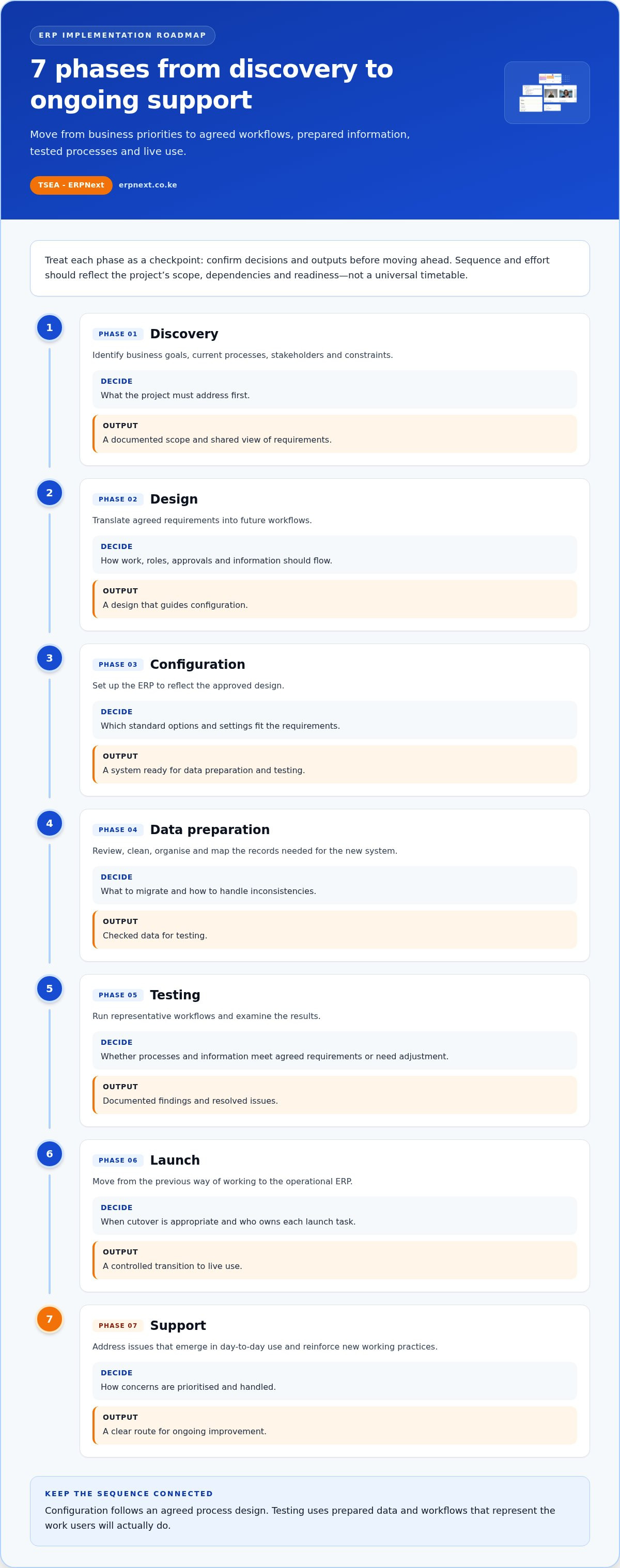
An ERP system implementation moves from business priorities to agreed workflows, prepared information, tested processes and live use. The phases give teams clear checkpoints. Sequence and effort should reflect the project’s scope, dependencies and readiness rather than a universal timetable.
Use each phase to confirm decisions and outputs before moving ahead. For example, configuration should follow an agreed process design, and testing should use prepared data that represents the work users will actually do.
- Discovery: Identify business goals, current processes, stakeholders and constraints. Decide what the project must address first; produce a documented scope and a shared view of requirements.
- Design: Translate agreed requirements into future workflows. Decide how work, roles, approvals and information should flow; produce a design that guides configuration.
- Configuration: Set up the ERP to reflect the approved design. Decide which standard options and settings fit the requirements; produce a system ready for data preparation and testing.
- Data preparation: Review, clean, organise and map the records needed for the new system. Decide what to migrate and how to handle inconsistencies; produce checked data for testing.
- Testing: Run representative workflows and examine results. Decide whether processes and information meet agreed requirements or need adjustment; produce documented findings and resolved issues.
- Launch: Move from the previous way of working to the operational ERP. Decide when cutover is appropriate and who owns each launch task; produce a controlled transition to live use.
- Support: Address issues that emerge in day-to-day use and reinforce new working practices. Decide how concerns are prioritised and handled; produce a clear route for ongoing improvement.
What happens before configuration and deployment?
Before configuration, sponsors and process owners establish goals, scope, decision-making responsibilities and the teams that need to contribute. Discovery documents how work currently happens and where business requirements differ. Teams then translate those needs into specific system requirements, such as the information a process requires or where an approval belongs. Design turns agreed requirements into a proposed way of working; configuration follows that design rather than assumptions made before stakeholders align.
What happens during go-live and after launch?
Go-live planning brings together cutover steps, user readiness, responsibility for launch decisions and a way to raise operational issues. Teams should know what changes on launch day, who coordinates the transition and where users can report problems. After launch, support focuses on resolving issues, clarifying processes and helping users build confidence with the agreed workflows. Define support arrangements in the project plan based on the system’s scope and business needs.
For organisations considering ERPNext, a discussion with TSEA can connect the platform to business goals and the decisions that shape each implementation phase. Explore the ERPNext implementation conversation.
How to Balance ERP Standardization, Customization, and Business Fit
A strong ERP design doesn’t need to reproduce every old step. It needs to support essential business requirements with clear, usable workflows. During ERP system implementation, teams can adopt standard processes, configure available options or consider more extensive customization. Choose based on what the business needs, not simply what its previous tools allowed.
Use this comparison to make the trade-offs visible before approving a change:
| Approach | Business fit | Decision effort | Maintenance implications | Change impact |
|---|---|---|---|---|
| Adopt standard workflows | Best when a repeatable process meets the business need. | Lower, if teams agree the standard is suitable. | Fewer unique adjustments to document and manage. | Teams may need to learn a different way of working. |
| Configure the ERP | Fits agreed workflows using available system options. | Moderate, as owners must select and validate settings. | Record the chosen settings and their purpose for future reference. | Usually requires teams to understand adjusted workflows. |
| Pursue customization | May address a defined requirement standard options don’t meet. | Higher, with added design and approval decisions. | Document ownership, purpose and how changes will be maintained. | Can affect established roles and processes, so plan adoption. |
When should a business adapt its process to the ERP?
Consider standardization for repeatable workflows shared across teams, such as how a request is reviewed or how information moves between departments. First ask whether the current process is essential, effective and consistently followed. If it is mainly a preference inherited from an older tool, adapting it may simplify coordination. Preserve differences that serve a clear business requirement, not exceptions that exist only because “that’s how we’ve always done it.”
When might configuration or customization be justified?
Configuration adjusts available system options to match agreed workflows. It can be a practical middle path when a standard process needs a defined variation. Consider more extensive customization only when a clear operational or compliance-related requirement cannot be met through standard workflows or available configuration. Before approving a change, document its business purpose, accountable owner, affected processes and future maintenance responsibility.
That record helps decision-makers compare a change’s value with its long-term implications. For example, if a team requests a different approval step, establish whether it addresses a necessary control or simply reflects a familiar habit. Then assess who will use the revised process and how it will be explained and tested. Make each exception earn its place.
The aim isn’t to force every business into identical workflows. Choose deliberately: standardize where work is repeatable, configure where available options provide the needed fit, and customize only for a well-defined requirement. An ERP should support how the business needs to operate, not mirror every legacy process.
How to Prepare Data, Teams, and Testing for ERP Adoption
Readiness is connected work. Clean records give teams useful test results; realistic testing exposes workflow gaps; prepared users can act on what those tests reveal. In an ERP system implementation, treat data quality, accountable owners, test coverage and user preparation as one coordinated effort, not separate boxes to tick before launch.
Effective ERP adoption depends on users understanding their workflows, responsibilities and how to raise issues. Assign an owner to each readiness area, then agree what “ready” means before moving forward.
- Data: Identify essential records and the people responsible for their accuracy.
- Testing: Cover everyday tasks, exceptions, approvals, reports and handoffs.
- People: Prepare users for changed responsibilities and give them a way to share feedback.
How should teams prepare data for an ERP?
Start by assigning data owners and agreeing which records are needed for the initial rollout. Cleanse the records by correcting incomplete or inconsistent entries, review duplicates and map each source field to the appropriate destination field. Then validate representative records in the prepared system. For example, check that a customer or stock item appears consistently wherever teams need it. These checks can expose mismatched fields or unreliable records before operational use.
Keep decisions visible: record who approved the data, how exceptions were handled and which records were excluded. This gives testers a dependable basis for checking workflows and reports. Use the project’s data migration guide for detailed migration steps. The key preparation principle is to verify the information teams will use, rather than assume that transferring records makes them ready.
How can teams test and prepare users?
Build role-based scenarios from real work across departments. A scenario might follow an order from sales through an inventory handoff, then check the information available to relevant roles and reports. Test normal tasks and exceptions, such as missing information or an approval that needs attention. Confirm permissions, expected results and handoffs between teams. This reveals whether the process works end to end, not just whether a screen opens.
Invite representative users to carry out the scenarios and explain where they hesitate or find steps unclear. Train people on the workflow, their responsibilities, how their work connects to other roles and how to navigate the system. Log feedback, assign owners to issues and retest fixes before expanding use. When users see their input lead to practical changes, preparation becomes part of adoption rather than a one-off training event.
Make readiness measurable with agreed checks: priority records have been reviewed, key scenarios have been completed, issues have owners and users know their responsibilities. To connect ERPNext with your business processes, explore ERPNext for connected business management.
How TSEA and ERPNext Can Support a Connected Implementation
Implementation connects business priorities with practical processes, usable information and clear responsibilities. TSEA provides ERPNext as an all-in-one business management platform for organisations seeking a connected approach. A good fit starts with understanding the business context and agreeing what the system needs to support.
Make the ERP system implementation discussion about how work happens, not assumptions about software. Identify the activities that matter, the teams involved and the outcomes the business wants to pursue. Those details provide a grounded starting point for discussing how ERPNext can fit the organisation’s goals.
Where can ERPNext fit across business operations?
ERPNext supports a range of sector contexts, including pharmacy chains, hospitality, manufacturing, retail and education. Organisations in these sectors may have different operating environments, workflows and priorities. A hospitality business and a manufacturer, for example, won’t necessarily define their most important processes in the same way.
Keep the discussion focused on your organisation’s requirements. Which teams need a clearer view of shared business information? Which workflows should be included in the implementation? Where do responsibilities or handoffs need to be understood before system decisions are made? Answering these questions helps frame a relevant plan without assuming that every organisation needs identical processes or system choices.
TSEA provides ERPNext for business management. Consider the platform alongside your goals, operational context and the processes you want the system to support. This keeps implementation planning anchored in business fit rather than a generic feature list.
What is a useful next step for an ERP implementation?
Prepare a short implementation brief before discussing the platform. Include the goals the business wants to pursue, the priority workflows involved, the stakeholders who understand or own those workflows, and the outcomes that would indicate progress. Note process dependencies or decisions that need input from more than one team. A concise brief gives everyone a shared basis for planning.
Keep the first conversation practical. Explain where information currently moves between teams, what makes coordination difficult and which processes should be considered first. These details clarify the business context and identify questions to address as implementation planning develops. They also help stakeholders distinguish immediate priorities from ideas that may belong in a later stage.
Ready to connect your business goals with ERPNext? Discuss your organisation’s context, priority workflows and desired outcomes with TSEA.
Turn Your ERP Plans Into a Confident Next Step
Give your implementation intent a practical starting point: create a brief that states the business change you want to make first, the decisions that need ownership and how your team will recognize progress. Keep it focused enough to guide action, but flexible enough to evolve as planning uncovers dependencies. This shared reference point can help leaders and users make consistent choices as ERP system implementation moves from ambition into daily practice.
You don’t need every detail settled before beginning a platform discussion. A clear priority, engaged stakeholders and a willingness to test assumptions can move planning forward without turning an early idea into a rigid commitment. Use the conversation to connect your organisation’s context with the possibilities you want to explore, then shape the next steps around what matters most to your operations.
Explore ERPNext with TSEA and start planning your implementation. Your next step can be clear, collaborative and grounded in your business goals.
Frequently Asked Questions
How long does ERP system implementation take?
There’s no single timeline for ERP system implementation; duration depends on workflow scope, team involvement, data readiness, decisions, testing and training. A project involving several departments or complex records may need more coordination than a focused rollout. Build the schedule from approved scope, named owners, dependencies and readiness checks. Treat phase estimates as planning assumptions to revisit, not fixed promises or universal benchmarks.
How much does ERP system implementation cost?
ERP implementation cost varies with the project’s scope, system requirements, data work, configuration, integrations, training and ongoing arrangements. A generic estimate may not reflect the resources your organisation needs. First, define the processes and outcomes included in the project, then identify the people, tasks and decisions required for each phase. This gives stakeholders a more useful basis for evaluating investment without assuming one fixed price.
Who should lead an ERP implementation project?
A business leader with authority to make decisions and resolve priorities should lead the project. They’ll need input from process owners, operational teams and technical stakeholders who understand how work is done and what the system must support. Assign named owners for requirements, data, testing and user preparation. For example, a process owner can approve whether a proposed workflow reflects actual practice, while leadership keeps decisions aligned with organisational goals.
Can a business keep using its existing systems during ERP implementation?
It may be possible to keep existing tools in use while the ERP is prepared and tested, but the transition depends on the systems, data flows, business risks and cutover plan. Decide which system is authoritative for each record during the overlap, and who is responsible for updates. For instance, teams need a clear rule about where to enter a transaction so duplicate or conflicting records don’t build up.
What is the difference between ERP configuration and customization?
Configuration adjusts available system settings to support agreed workflows; customization changes or extends system behaviour beyond those settings. Before requesting customization, write down the business need, who owns it and how the change may affect future maintenance and users. Check whether adapting the process or using an available setting would meet the requirement. This helps distinguish a genuine operational need from a preference carried over from an older tool.
What should businesses measure after ERP go-live?
Measure performance against the goals set for the project, rather than relying on a generic success score. Depending on those goals, track workflow completion, record accuracy, processing delays, user adoption or consistency in reports. For example, if the objective is more dependable reporting, assign an owner to review whether teams are recording information consistently. Establish a baseline where practical, review results after launch and use findings to guide follow-up training or process adjustments.


