
What if an ERP rollout depended less on the software and more on who owns each task before launch? If responsibilities are unclear, data is incomplete, or testing is rushed, everyday operations can take the hit. A practical ERP implementation checklist gives your team a clearer route from planning to go-live.
A successful rollout needs more than a project plan. It needs named owners, agreed evidence of completion, and approval gates that show when each phase is ready to move forward. This guide turns those needs into a phased checklist for your Kenyan business, covering team preparation, process decisions, data readiness, testing, user training, and the transition to live operations. It also shows how to assess ERPNext against your business requirements, including processes for retail, hospitality, manufacturing, or pharmacy chain management. Use the checklist to align departments, catch gaps before they disrupt work, and make launch decisions with greater confidence.
Key Takeaways
- Use an ERP implementation checklist to connect rollout tasks with accountable owners, completion evidence, and approval points.
- Set business outcomes and launch priorities before configuring ERPNext, then assign clear decision-making roles across departments.
- Prepare data systematically by identifying its sources, cleaning records, mapping fields, and planning reconciliation.
- Build realistic workflow tests with named testers, expected results, and evidence to support a confident go-live decision.
- Plan cutover in sequence, from final approval and data migration to launch monitoring and issue triage.
Why Kenyan businesses need an ERP implementation checklist before rollout
An ERP rollout involves connected decisions about people, processes, data, and systems. If one department assumes another team has approved a workflow, or a data task has no clear owner, the gap may surface during testing or live operations. A shared checklist makes these handoffs visible early. It cannot eliminate every risk or guarantee an interruption-free launch, but it gives leaders a practical way to track readiness and act on open issues before they become harder to manage.
An ERP implementation checklist is a control document that links each rollout task to an accountable owner, a due point, completion evidence, and an approver. Its purpose is to make progress verifiable, surface dependencies, and clarify what must be complete before the next decision.
Make the checklist specific to your organization. A Kenyan business with several branches may need to capture differences in workflows, reporting, or responsibilities, while a smaller operation may focus on fewer launch-critical processes. Sector, company size, existing systems, and local ways of working all shape what belongs on the list. An overview of Enterprise resource planning (ERP) systems can provide useful context, but your rollout controls should reflect how your business operates.
What should an ERP implementation checklist contain?
Give each task enough detail for someone outside the conversation to understand its status and next step. Record the accountable role, due point, dependencies, evidence of completion, and approver. For example, a data-mapping task could depend on an agreed process design. A reviewed mapping file can serve as completion evidence, with a designated project lead approving the work.
- Task and owner: Describe the work and name the accountable role.
- Due point and dependency: Show when it must be done and what needs to happen first.
- Evidence and approver: Specify what proves completion and who accepts it.
Separate essential launch work from later improvements and optional enhancements. This helps teams protect the agreed launch scope without treating every useful idea as a go-live requirement. Project leads should maintain one shared status source, with clear labels for not started, in progress, blocked, and complete. Record decisions and changes there too, so departments are not working from conflicting updates.
Who should use the checklist across a Kenyan business?
The checklist is a working tool for both decision-makers and the people doing the work. Executive sponsors set direction and resolve escalated decisions; project leads coordinate tasks and status; process owners define and approve workflows. Finance, operations, and end users contribute practical requirements and test whether proposed processes match day-to-day work.
For a business operating across branches or departments, involve representatives who understand each relevant workflow. A branch may follow a different approval route or operating practice from another, so record agreed common processes and valid variations rather than assuming one approach fits all. Assign responsibilities according to your governance structure, with a named role for every approval and escalation point.
Set ERP project scope, owners, and governance before configuring the system
Configuration should follow business decisions, not substitute for them. Before teams set up ERPNext, agree what the rollout must achieve, which workflows belong in the first launch, who can make decisions, and how changes will be approved. This creates a clear operating boundary and helps departments focus on the processes that matter most.
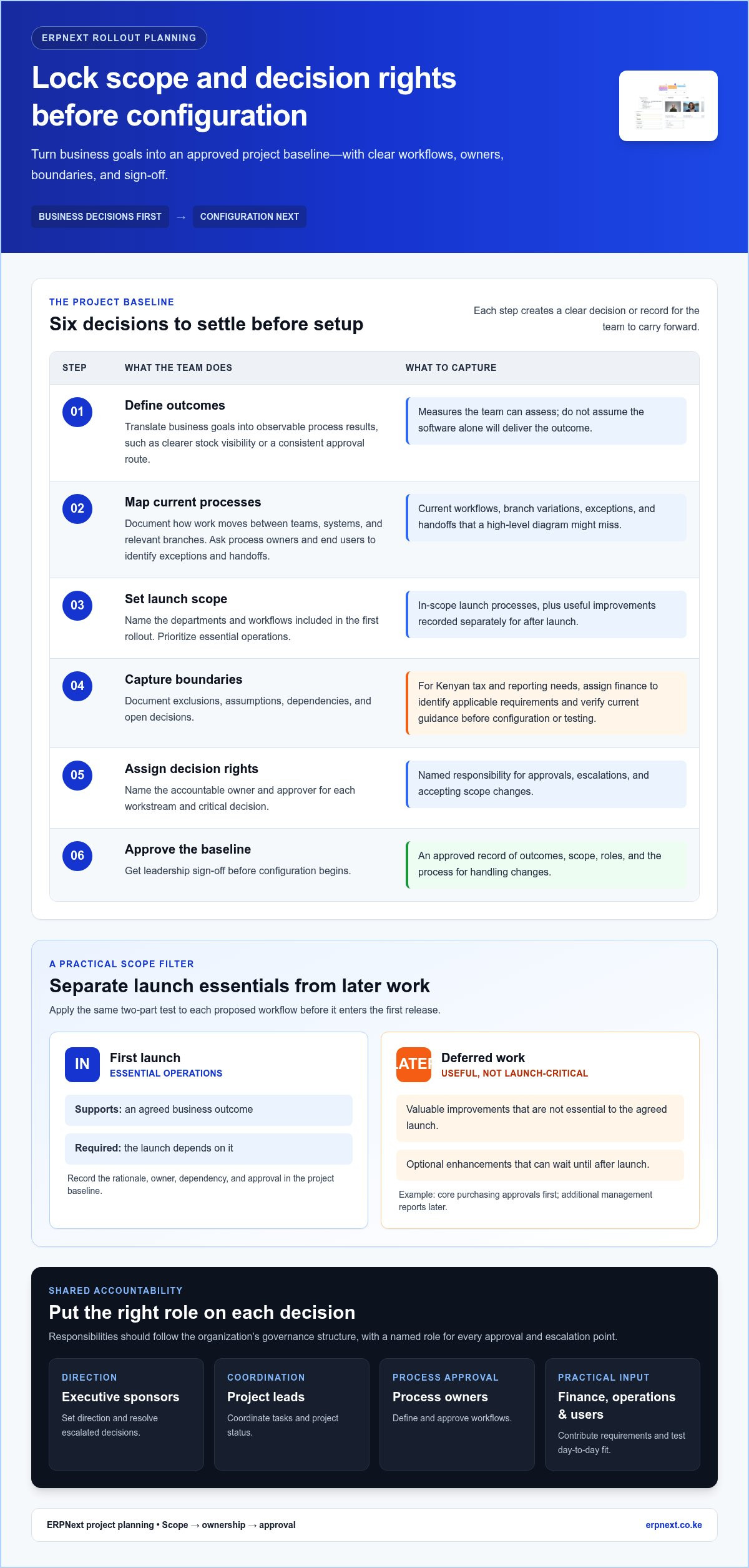
Use this sequence to turn those decisions into an approved project baseline:
- Define outcomes. Translate business goals into observable process results, such as clearer stock visibility or a consistent approval route. Set measures your team can assess without assuming the software alone will deliver them.
- Map current processes. Document how work moves between teams, systems, and relevant branches today. Ask process owners and end users to identify exceptions and handoffs that a high-level diagram could miss.
- Set launch scope. Name the departments and workflows included in the first rollout. Prioritize essential operations, then record useful improvements that can wait until after launch.
- Capture boundaries. Document exclusions, assumptions, dependencies, and open decisions. For Kenyan tax and reporting needs, assign finance to identify applicable requirements and verify current guidance before those requirements are configured or tested.
- Assign decision rights. Name the accountable owner and approver for each workstream and critical decision, including the person authorized to accept scope changes.
- Approve the baseline. Record leadership sign-off on outcomes, scope, roles, and the process for handling changes before configuration begins.
How do you define ERP scope and launch priorities?
Use a simple test for each proposed workflow: does it support an agreed business outcome, and does the launch depend on it? Include high-priority processes with a clear rationale. Put valuable but nonessential enhancements on a deferred-work list. For example, a business might include core purchasing approvals in the first release while scheduling additional management reports for later. Record each decision, owner, dependency, and approval in the project baseline.
How should the ERP project team assign ownership?
Build the team around the work, not job titles alone. Finance, operations, sales, inventory, and relevant sector-specific process owners should represent the workflows in scope. Executive sponsors resolve escalations, while the project lead coordinates delivery. Each workstream needs one accountable owner and a named approver, even when several people contribute. Assign branch representatives where practices differ.
Set a meeting rhythm that suits the project, define how urgent issues reach decision-makers, and keep a dated decision log. Route each proposed scope change through a short review: describe the request, assess its effect on launch priorities and dependencies, identify the decision-maker, and record approval or deferral before adding the work. This helps prevent quiet scope expansion.
Once requirements are clear, explore ERPNext for your business processes as a platform option against the approved scope. Decide what the rollout should accomplish before configuration begins.
Prepare business data, workflows, and integrations for ERPNext
Prepare data and connected processes before configuring or moving them. Treat each migration item as a controlled business decision: identify its source, accountable owner, cleanup rules, mapping, and reconciliation evidence. The ERP implementation checklist should also connect each configured workflow to a business requirement and an approver. This gives teams a clear record of why a process is changing and who accepts the result.
Work through data readiness in sequence:
- Assign data owners. Name the person responsible for the quality and approval of each data group, such as customer, supplier, item, or finance records.
- List sources. Record where each dataset lives, who maintains it, and which records are active or needed for launch.
- Clean the records. Identify duplicates, missing fields, inconsistent naming, and format differences. Agree correction rules with the relevant owner rather than silently changing source information.
- Map and approve. Document how each source field maps to the intended ERPNext record or process. Record assumptions and obtain owner approval before migration.
- Reconcile a sample. Compare migrated sample records with trusted source data, check opening balances where relevant, and document discrepancies, decisions, and sign-off.
Prioritize master data, opening balances, and active records needed for launch operations. Bring across historical information only when teams have identified a clear operational or reporting need. For every excluded dataset, note the decision and where it will remain accessible, so users understand the new system’s boundaries.
What data should be cleaned and migrated first?
Start with the records that support approved launch workflows, not simply the largest files. An inventory process, for example, depends on consistent item records, while purchasing needs reliable supplier details. Data owners should approve formats, required fields, duplicate handling, and migration rules. Reconcile a representative sample from each important dataset against its source, assign exceptions for resolution, and retain evidence of approval before treating the data as ready.
How should teams document workflows and integrations?
Map the handoffs that connect finance, inventory, sales, purchasing, and relevant sector operations. For each workflow, state the business need, the steps and roles involved, the intended ERPNext process, and the accountable approver. This makes configuration decisions easier to review and prevents teams from automating an outdated process before agreeing on the desired outcome.
Inventory every system expected to exchange information with the ERP environment. Record its purpose, data exchanged, direction of flow, business owner, dependencies, failure handling, and required test evidence. Note whether data moves into the ERP environment, out to another system, or both. Define how the team will identify and resolve a failed transfer.
For Kenyan operations, test how transactions are recorded in Kenyan shillings (KSh), including cases relevant to your workflows. Ask finance to verify current local tax and reporting requirements against authoritative guidance before configuring or describing any compliance outcome. Keep the requirement, source, owner, and review date in the project record.
Test ERP processes and prepare Kenyan teams before the go-live decision
Testing should prove that real work can move through the agreed process, not just that a screen opens. A staged test-and-training plan gives teams a chance to surface gaps, correct issues, and build confidence before launch. It cannot remove every risk, so make readiness a documented decision based on results, open issues, user preparation, and recovery responsibilities.
Use this workflow matrix to assign test ownership and capture evidence. Replace roles or scenarios with those that match your business:
Finance workflow
Tester: Finance process owner
Scenario: Enter a representative transaction in KSh, follow its approval path, and review the resulting report and reconciliation.
Expected result: The transaction follows the approved steps and figures reconcile to the agreed source.
Evidence: Test record, report output, reconciliation, and owner approval.
Inventory workflow
Tester: Inventory owner and end user
Scenario: Record a receipt, process a stock movement, and review the resulting records for the relevant branch.
Expected result: The quantities and approvals match the scenario and agreed process.
Evidence: Transaction references, review results, and sign-off.
Sales or purchasing workflow
Tester: Sales or purchasing process owner
Scenario: Complete a representative order from entry through approval and reporting, including a business-relevant exception.
Expected result: Required steps and exception handling follow the approved design.
Evidence: Test notes, output, and process owner acceptance.
Integration workflow
Tester: Named integration owner and business user
Scenario: Send or receive the agreed test data, then observe the outcome of a failed or incomplete transfer where relevant.
Expected result: The data reaches the intended destination, and the agreed failure process is clear.
Evidence: Transfer results, issue record, and retest approval.
For Kenyan currency and reporting cases, use scenarios that reflect your operations, and have finance verify current reporting requirements before treating a result as a compliance test. For each defect, record severity, business impact, owner, resolution, retest result, and final acceptance. Test role permissions, branch variations, and exception paths that could affect daily work.
Which ERP scenarios should users test before launch?
Test complete workflows from transaction entry through approval, reporting, and reconciliation, rather than isolated steps. Involve the people who perform the work, and include relevant branch and integration outcomes. A defect is not closed until it is retested and accepted by the accountable business owner. Keep the evidence together so leaders can see what passed, what failed, and what remains unresolved.
How can a team prepare users for ERP change?
Identify affected roles and tailor practice to each person’s tasks. Use realistic scenarios, concise job aids, a clear feedback route, and attendance or readiness records. Assign a business owner to explain process changes and track unanswered concerns. The ERP implementation checklist should make user readiness visible alongside test results.
Before approving go-live, leaders should review unresolved issues against agreed severity thresholds, confirm required business approvals, assess whether affected users are ready, and name who handles recovery decisions and continuity actions. Explore ERPNext for your operations as you assess how it fits your business workflows.
Launch ERPNext with a controlled cutover and post-go-live checklist
Go-live is a sequence of controlled handoffs, not a single button press. The cutover plan should show what happens, who owns it, what evidence confirms completion, and who can pause or proceed. Keep the approved launch scope close at hand, and make the go/no-go decision from readiness evidence rather than calendar pressure.
Use this ordered cutover checklist, adapting timing and roles to your operating model:
- Record final approval. Confirm that authorized business owners accept the launch scope, critical workflow test results, user readiness, and any documented open issues.
- Freeze agreed data changes. The cutover owner communicates when updates to source records must stop or follow a controlled process, reducing the risk of conflicting changes during migration.
- Migrate approved data. The data owner confirms the selected records and migration completion evidence against the agreed plan.
- Validate the result. Process owners check key records, balances where relevant, access roles, integrations, and critical workflows against agreed acceptance criteria.
- Make the go/no-go decision. The decision authority reviews validation results, unresolved issues, and recovery responsibilities, then records the decision and approvers.
- Launch and monitor. The launch lead communicates the decision and next steps. Named issue-triage and continuity owners monitor operations and escalate problems through the agreed route.
Before proceeding, verify approved scope, migrated-data checks, role access, integration results, and critical workflow tests. The go/no-go record should identify approvers, the decision, accepted open issues and their owners, and any conditions that would trigger a pause or recovery action.
What belongs on the ERP go-live checklist?
Make responsibilities explicit: the cutover owner coordinates the sequence, the decision authority approves or pauses launch, and the communications lead updates affected users. Name who receives and prioritizes issues, who assesses business impact, and who leads continuity actions if a critical process cannot proceed. Record contact routes and escalation steps in the shared plan so teams can act without guessing.
How should the team manage ERP operations after launch?
Keep the handover active after launch. Assign owners for user questions, support requests, recurring data-quality checks, and process issues. Review data accuracy, user adoption, and unresolved operational problems with business owners at agreed checkpoints. Capture each improvement request, assess its priority and impact, and schedule approved changes through controlled decisions rather than making untracked adjustments.
With rollout needs and workflows defined, explore ERPNext for your business as an all-in-one business management platform for connected operations, including pharmacy chain management and hospitality. TSEA - ERPNext reports more than 250 satisfied customers worldwide. This is company experience, not a promise of a particular implementation outcome.
Turn rollout readiness into your next business decision
Use the ERP implementation checklist as a decision tool: compare your agreed business requirements with the platform’s ability to support the workflows you need, then carry those priorities into planning. Focus on practical fit for your people and operations, not a feature list in isolation.
ERPNext is an all-in-one business management platform, and TSEA reports more than 250 satisfied customers worldwide. These points offer context as you assess whether the platform aligns with your organization’s goals. Your requirements should remain the guide for a sound decision.
Explore ERPNext for your business and take the next step toward a rollout built around clear priorities and accountable decisions.
Frequently Asked Questions
What is an ERP implementation checklist?
An ERP implementation checklist is a shared working record that makes rollout responsibilities and decision points visible to everyone involved. It can track prerequisites such as approved process designs or verified source records, and show what evidence supports completion. For example, a branch manager can see whether a required workflow decision is still pending before local teams prepare. Tailor entries to your own systems and operations.
How long does an ERP implementation take?
ERP implementation timing varies by business, so there is no dependable universal duration. A company replacing one system with clean, well-understood records may face a different path from a multi-department rollout with legacy data and connected applications. Build estimates from discovery: list decision milestones, data preparation, configuration, testing windows, and staff availability. Review schedule assumptions when a dependency changes rather than treating an early estimate as a fixed promise.
Who should be on an ERP implementation team?
An ERP team should include an executive sponsor, project lead, business process owners, data owners, technical or integration leads, and people who will use the system. Add finance and operations as needed, plus sales or inventory representatives if their work is affected. For each role, name a decision boundary and a backup contact so approvals and questions can keep moving during staff absences or handoffs.
What data should be prepared before ERP implementation?
Prepare records needed for launch by separating master data, current transactions, opening positions, and historical records. Identify the authoritative source for each field, such as which customer address should prevail if two systems disagree. Ask the data owner to approve that rule before migration. Keep historical information only when it has an identified operational or reporting purpose, and document why older records are excluded or retained for reference.
How do you know when an ERP system is ready to go live?
An ERP system is ready when it meets launch criteria agreed before the go-live decision. A failed critical approval path, unexplained balance difference, or unowned high-impact defect may be a reason to pause. A lower-impact issue might be accepted if it has an owner and due point. Confirm that business approvers understand open items and recovery responsibilities, then record a clear go or no-go decision.
Should a business launch an ERP all at once or in phases?
A phased rollout can help teams learn from one workflow or group before extending the change. A broader launch may suit processes that rely on shared data and simultaneous handoffs. Compare options using actual dependencies, staffing, testing coverage, and the consequences of running old and new processes in parallel. Choose a sequence the business can govern, and define how records and decisions will remain consistent between phases.
What should happen after ERP go-live?
After go-live, maintain a visible queue for user questions, data corrections, and process issues, with an owner and status for each item. Review recurring problems by workflow rather than treating every request as isolated. Repeated confusion may point to a training gap or process-design issue. Compare adoption with intended use, agree improvement priorities with process owners, and capture lessons for the next release or rollout phase.


