
The best ERP system for your business is the one that fits your workflows, finance needs, growth plans and implementation capacity, not simply the one with the longest feature list. A useful ERP software comparison weighs total cost alongside core features, industry capabilities, finance tools and how well each option connects your operations.
Choosing software is a major decision: the right fit can bring key processes into one system, while a mismatch can add complexity and extra work. This guide shows you how to compare ERP costs without relying on headline prices, assess essential features and finance capabilities, and judge how each option fits a business operating in Kenya. You’ll also see how cloud and self-hosted approaches differ, what to include in a practical comparison table, and how to narrow your shortlist based on the way your business works and plans to grow.
Key Takeaways
- Compare cloud and on-premise options by weighing implementation needs, operating costs, and how each deployment fits your business.
- Map ERP benefits to everyday work, from reducing duplicate tasks to supporting clearer processes and compliance workflows.
- Match industry capabilities to the work your business actually does, including specialist needs in pharmacy and hospitality.
- Separate full ERP platforms from finance-focused tools, then compare how well each supports reporting, integration, and future growth.
How do you compare two ERP systems?
A practical ERP software comparison weighs deployment, implementation effort, integration, and five-year operating costs. In Kenya, match each system to workflows such as inventory management, warehouse operations, manufacturing, and retail.
Cloud Deployment
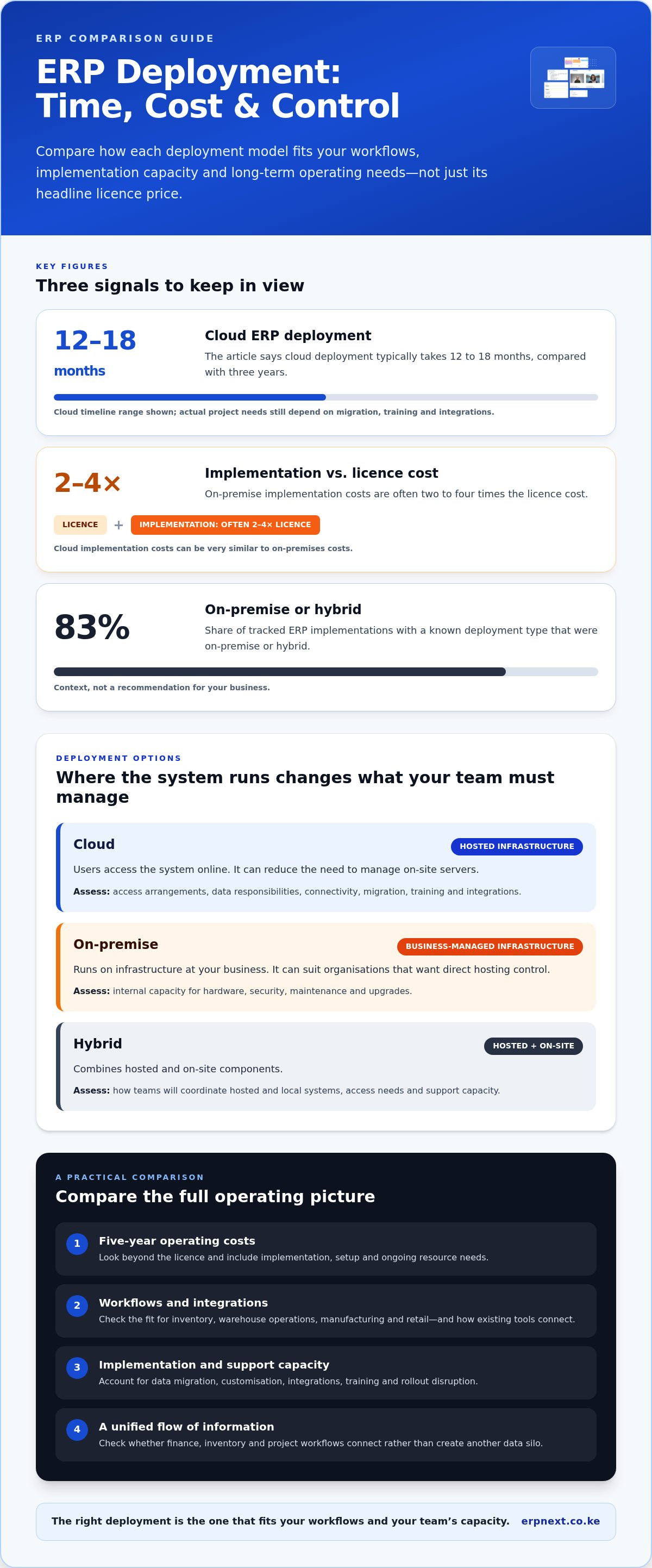
Cloud ERP runs on hosted infrastructure, with users accessing the system online. It can reduce the need to manage on-site servers, while connectivity, data migration, training, and integrations still shape the project. Cloud ERP deployment typically takes 12 to 18 months instead of three years. Compare access arrangements, data responsibilities, and plans for connecting existing business tools.
On-Premise Deployment
On-premise ERP runs on infrastructure managed at your business location. It can suit organisations wanting direct hosting control, but requires internal capacity for hardware, security, maintenance, and upgrades. Implementation costs are often two to four times the licence cost, and cloud implementation costs can be very similar to on-premises costs. Include setup and ongoing resource needs.
Hybrid deployment combines hosted and on-site components. Of tracked ERP implementations with a known deployment type, 83% were on-premise or hybrid. Treat that figure as context, not a recommendation. Map each model to access needs, existing systems, and support capacity. A unified system should connect finance, inventory, and project workflows rather than create another data silo.
What are the best ERP software options for businesses in Kenya? Cloud, on-premise, and hybrid systems are the main deployment options. The best fit depends on your operating model, integration needs, and infrastructure capacity.
What are the main risks and hidden costs of choosing and implementing ERP software? Data migration, customisation, integrations, training, and rollout disruption can add work beyond licensing. Compare the full implementation scope, since implementation costs are often two to four times the licence cost.
What questions should Kenyan businesses ask ERP vendors before buying? Ask how the system fits your workflows, what data migration and integrations involve, and how training and support are handled. Request a clear breakdown of implementation tasks and ongoing responsibilities.
| Deployment option | Hosting control | Key comparison |
|---|---|---|
| Cloud | Hosted infrastructure | Online access and integration needs |
| On-premise | Business-managed infrastructure | Internal maintenance and upgrade capacity |
| Hybrid | Shared across environments | Coordination between hosted and local systems |
Use your ERP software comparison to choose an option that supports the required workflows and integrations within your team’s implementation and support capacity.
ERP benefits, including productivity and compliance
ERP benefits come from connecting work that separate tools leave fragmented. Linking sales orders, inventory, purchasing and finance, for example, can reduce repeated data entry and give teams a shared view of transactions. Automation can route approvals or update stock records, leaving staff more time for exceptions and customer work.
Productivity depends on fit, not the enterprise label. Compare SAP, Microsoft Dynamics and Epicor against your processes, reporting needs, integrations and users’ ability to adopt the system. A product directory can help build a shortlist, but a practical comparison should test real workflows, such as an online order flowing into inventory and finance.
Which ERP systems support Kenyan shillings, VAT and KRA eTIMS? Compare each product’s ability to record KSh transactions, configure VAT workflows and connect with the eTIMS processes your business uses. Ask for a demonstration using representative invoices and reports, then assess how exceptions and corrections appear in the audit trail.
Compliance support is not the same as automatic compliance. Review permissions, approval records, transaction histories and finance reports, then map them to your internal controls. For example, test whether an authorised user can trace a purchase from approval through payment without relying on separate spreadsheets.
Migration deserves its own assessment. Moving from SAP or another ERP involves mapping existing records, cleaning duplicates, redesigning processes and testing reports before cutover. Compare migration scope and integration responsibilities alongside product features: a strong feature list cannot compensate for incomplete or poorly mapped data.
How long does ERP implementation take, and what steps are involved? A typical large ERP implementation, such as SAP, Oracle, or Microsoft Dynamics, takes 18 months to three years. The work typically moves through requirements, configuration, data migration, integration, user testing, training, and cutover, with each stage preparing teams for the next.
Build your shortlist around demonstrated workflows and implementation readiness, not brand recognition alone. Explore integrated business platform features as one example to assess against your requirements.
Industry-specific ERP capabilities
An ERP system should reflect how your industry operates, not just centralise records. A retailer needs clear links between sales, purchasing, stock and finance. A manufacturer may need production planning, materials and work-in-progress visibility. Compare these workflows with the system’s standard capabilities before assessing customisation.
Standard ERP tools support common processes across sectors, such as purchasing and financial reporting. Industry-specific systems add workflows designed around a particular field—such as tightly regulated sectors where specialized platforms like PROTEUS420 integrate cultivation, processing, distribution, and retail operations into one connected ecosystem. Customisation can bridge a gap, but each change needs design, testing and ongoing maintenance. For example, map a manufacturer’s production steps before deciding whether standard functionality fits.
Vendor suitability depends on both product scope and the work your teams must complete. Include NetSuite and Microsoft Dynamics in your shortlist, then assess them through the same business scenarios. Check how each handles your finance processes, inventory records, approvals and reporting needs. A familiar name alone doesn’t establish industry fit.
Use a consistent demonstration script. Ask each vendor to show an order moving through a relevant workflow, such as a retail sale affecting stock and finance. For manufacturing, trace a material requirement through production planning and purchasing. Record whether the process works as standard, needs configuration or depends on custom development.
For a Kenyan business with global suppliers or customers, include cross-border workflows in your assessment. Check how the proposed system handles your organisational structure, reporting needs, and connections to existing tools. Also assess whether on-premise or cloud delivery suits the way staff access the system and how your team manages technology.
Score each shortlisted ERP against specific tasks rather than broad claims. Note which requirements are supported directly, which need configuration and which require separate applications. Then compare the effect on staff, data flow and ongoing maintenance. This makes industry fit measurable and reveals where a general-purpose platform may need adaptation.
ERP software types and finance software comparisons
Choose the software type by starting with the work it must connect. An accounting tool records transactions and produces reports. An ERP platform links finance with operations, such as purchasing, inventory, sales and project management. The difference matters when a stock movement must update records across departments.
Cloud-based ERP can bring finance and operational functions together, while third-party applications can extend its capabilities. A native feature runs within the ERP; an integrated application exchanges data with it. Compare both approaches by testing a real workflow, such as a supplier invoice updating accounting and stock records without duplicate entry.
What integrations do popular ERP systems offer for accounting, payroll, inventory and banking? Options can include native modules, connectors or application programming interfaces that exchange records between systems. Compare each integration’s data fields, update timing, error handling and reconciliation process using a representative transaction.
For a Kenyan business, test the finance workflow with KSh transactions, VAT records and the reports your team uses. Then trace a payment from an invoice through approval and reconciliation. Assess payroll and banking connections separately from inventory links, since each handles different records and permissions.
A mature ERP should support a high percentage of business needs, including industry requirements. An emerging provider may offer basic functions but have limited capacity for complex or expanded needs. Mark each requirement as supported directly, handled through an integration, or dependent on custom work. That distinction reveals the operational effort behind a feature list.
- Accounting: Test journals, approvals, and reporting.
- Payroll: Check employee data flow and posting records.
- Inventory: Trace stock changes into purchasing and finance.
- Banking: Review transaction imports and reconciliation steps.
For pharmacy chains, include branch-level stock and finance workflows in the same comparison. Explore integrated ERP capabilities as one option for assessing connected operations.
TSEA - ERPNext: ERPNext
TSEA - ERPNext is a practical next step if your comparison points toward an all-in-one business management platform. Its offerings include ERPNext, Pharmacy Chain Management, and Hospitality. This makes it relevant to businesses assessing those needs. Start by matching the offering to the workflows you want to bring together, then compare that fit against your operational priorities.
For pharmacy businesses, Pharmacy Chain Management is a relevant option to consider; hospitality businesses can assess the Hospitality offering. ERPNext may suit organisations looking to evaluate a unified platform across business needs. These options provide a focused starting point after comparing deployment, industry fit, and finance requirements.
To explore how ERPNext or TSEA’s industry solutions could fit your workflows, contact TSEA or visit erpnext.co.ke.
Turn Your Shortlist into a Clear Next Step
Make your next move practical: choose a business workflow that matters, document how it works today and use it to assess your shortlisted system. This gives decision-makers a shared reference point for discussing priorities, responsibilities and rollout readiness. A useful ERP software comparison should lead to a decision your team can act on, not another round of feature browsing.
TSEA offers ERPNext, Pharmacy Chain Management and Hospitality. If one fits your operational focus, connect your requirements to the relevant offering and discuss how it aligns with your business processes. Bring the workflows your team wants to improve and the outcomes it needs from a business platform.
Contact TSEA - ERPNext to explore the next step for your business. Choose with clarity, and move forward with a plan your team can own.
Frequently Asked Questions
What are the best ERP systems for your business?
The best ERP system is the one that handles your priority workflows with manageable complexity. Shortlist options such as ERPNext, SAP, Microsoft Dynamics and Oracle, then test each against a real business scenario. For example, trace a customer order from entry to fulfilment and reporting. Compare how much configuration the process needs, who will maintain it and whether staff can use it effectively.
What are the 3 leading ERP systems?
SAP, Microsoft Dynamics and Oracle are prominent ERP options businesses often include in a shortlist. Treat them as candidates, not a universal ranking: suitability depends on operational needs, industry workflows, integrations and implementation capacity. Ask each vendor to demonstrate the same task, such as approving a purchase and recording its effect on finance. Comparing one scenario makes differences easier to assess.
What is enterprise resource planning (ERP)?
Enterprise resource planning is software that helps an organisation manage connected business activities through shared processes and information. For example, a purchase can move from request to approval, receipt, and financial recording within a coordinated workflow. This can reduce the need to re-enter the same details in separate tools. ERP scope varies, so define which teams and processes need to work together before selecting a system.
Which ERP makes sense for retailers with 10-100 employees?
For a retailer with 10-100 employees, shortlist systems that can connect sales, stock, purchasing, and financial records without making daily tasks cumbersome. Test a typical scenario: receive goods, sell an item, record a return, and review stock availability. Include branch workflows if relevant, and assess how staff roles affect access. The right fit depends on the retailer’s processes and ability to support the system.
How do leading ERP systems compare in features and ease of use?
Compare leading systems by testing the same tasks instead of relying on feature lists. For example, ask users to enter an order, locate an item and produce a relevant report. Note the steps involved, access permissions and whether the workflow requires configuration or another application. Also assess training needs with the people who will use the system daily. A useful demonstration should reflect real work.
Which ERP software is best for small, medium, and large businesses?
Choose by process complexity and growth needs, not employee count alone. One market guide describes small businesses as having 10-50 employees, mid-market organisations as having 50-2,000, and large enterprises as having 2,000 or more. These categories can help organise a shortlist, but assess each organisation’s workflows, reporting structure, and expansion plans. A smaller firm with complex operations may need broader capabilities than its size suggests.


