
Excel still has a place for flexible analysis and one-off tasks, but it becomes harder to rely on as the source of truth for shared business operations. For SMEs, a standard ERPNext implementation typically takes 1-3 months, depending on the modules and data migration requirements. The decision to replace spreadsheets with ERP is strongest when repeated handoffs, duplicate records and manual updates are slowing work or obscuring what’s happening.
Spreadsheets are familiar, adaptable and useful for quick calculations, so moving everything into a new system isn’t automatically the right choice. The goal is to give recurring, connected workflows a dependable home while keeping Excel where it still adds value.
This guide explains how to assess ERP readiness, prepare clean master data and plan a migration. It also compares ERP with other ways to manage spreadsheet-heavy work, helping you weigh options against your workflows and requirements. You’ll get a clearer view of where Excel still fits, what a practical transition involves and how to decide whether to replace spreadsheets with ERP.
Key Takeaways
- Use spreadsheet complexity, recurring errors and slow handoffs to judge whether connected workflows need a shared system.
- Plan migration around module scope, data quality and staff adoption, then track whether duplicate work is declining.
- Clean item, customer and supplier records before importing transactions so teams start with consistent, usable data.
- Compare alternatives against the same workflows and integration needs, and keep Excel for flexible analysis where it still works well.
Assessing readiness for a first-time ERP implementation
Readiness means your workflows, records and staff can move into one shared system. Start by identifying where spreadsheet handoffs cause delays, errors or unclear ownership.
For Kenyan businesses, assess whether the ERP can support eTIMS invoice workflows and tax reporting. Map tax codes, invoice fields and submission steps to your business obligations before configuration.
Look for measurable pressure points: more than 10 linked Excel files with complex formulas, or a monthly close taking more than 3 days, are signs to investigate. Also test whether your team can maintain one accurate record for customers, suppliers and stock. A business processing 1,000 SKUs, serving 500 customers and handling 200 transactions per day may find spreadsheet updates increasingly difficult to coordinate.
Training and Implementation Support
ERP implementation and training cover system setup, data transfer, workflow testing and staff instruction. Teams need to know which system holds the current record and how their daily tasks will change. Use role-based practice: have purchasing staff enter a request, then follow it through approval and reporting. Name process owners before training begins so questions and corrections reach the right person.
ERP Selection and Implementation Steps
ERP selection and implementation involve matching a system to business workflows, then configuring and launching it. A clear scope helps prevent teams from automating broken processes. Document essential workflows, compare systems using the same examples, confirm eTIMS and tax-process needs, clean master data and test migrated records. Then rehearse the transition with named task owners, go/no-go criteria and a recovery plan.
Measure success against a baseline, not a general impression. Track inventory record accuracy as correct counts divided by all counted records. Measure purchasing cycle time from approved request to issued purchase order, and fulfillment exceptions as orders needing intervention divided by orders processed. Review these reports after launch. Fewer exceptions and less manual rekeying can show whether the new workflow is replacing duplicate spreadsheet work.
How long does migrating from Excel to ERP take?
A standard SME implementation typically takes 1-3 months, depending on modules and data migration requirements. The switch also involves training, workflow testing and deciding when spreadsheets stop being the working record.
Set the schedule around the work, not just software setup. Scope expands when teams have inconsistent item records, several approval paths or transactions that need reconciliation. In manufacturing, production planning and stock movements may need separate testing before launch. Agree on a cutoff point, assign owners to open transactions and rehearse the handover so orders and inventory aren’t split between systems.
Staff Training and Adoption
ERP staff training and adoption mean preparing employees to complete daily tasks in the new system. A configured workflow works only when people use it consistently. Train by role, using realistic tasks such as receiving stock, recording a production issue or approving a purchase request. Give each team a clear way to report blockers, then revisit the workflow when repeated questions reveal a training gap.
Monitoring Adoption and Retiring Workbooks
Adoption monitoring tracks whether staff use ERP workflows and whether duplicate workbooks still drive decisions. It matters because parallel records can undermine confidence in the new system. Run Excel and ERP in parallel for the first 1-2 months after migration, comparing key records and reports. Track staff time spent rekeying data, investigate recurring differences, then mark each workbook as retired once its process works reliably in ERP.
Cloud ERP doesn’t remove every operational challenge. Implementation still takes coordination, and real-time visibility into execution can be limited. In manufacturing, for example, a production team may need a defined process for recording delays and exceptions. Clear ownership and timely updates help managers act on current information instead of waiting for spreadsheet reports.
To replace spreadsheets with ERP, set a realistic transition plan, train employees around their roles, and measure duplicate work before retiring files. A structured ERP migration can help connect the schedule, data handover and adoption plan.
Cleaning master data before importing transactions
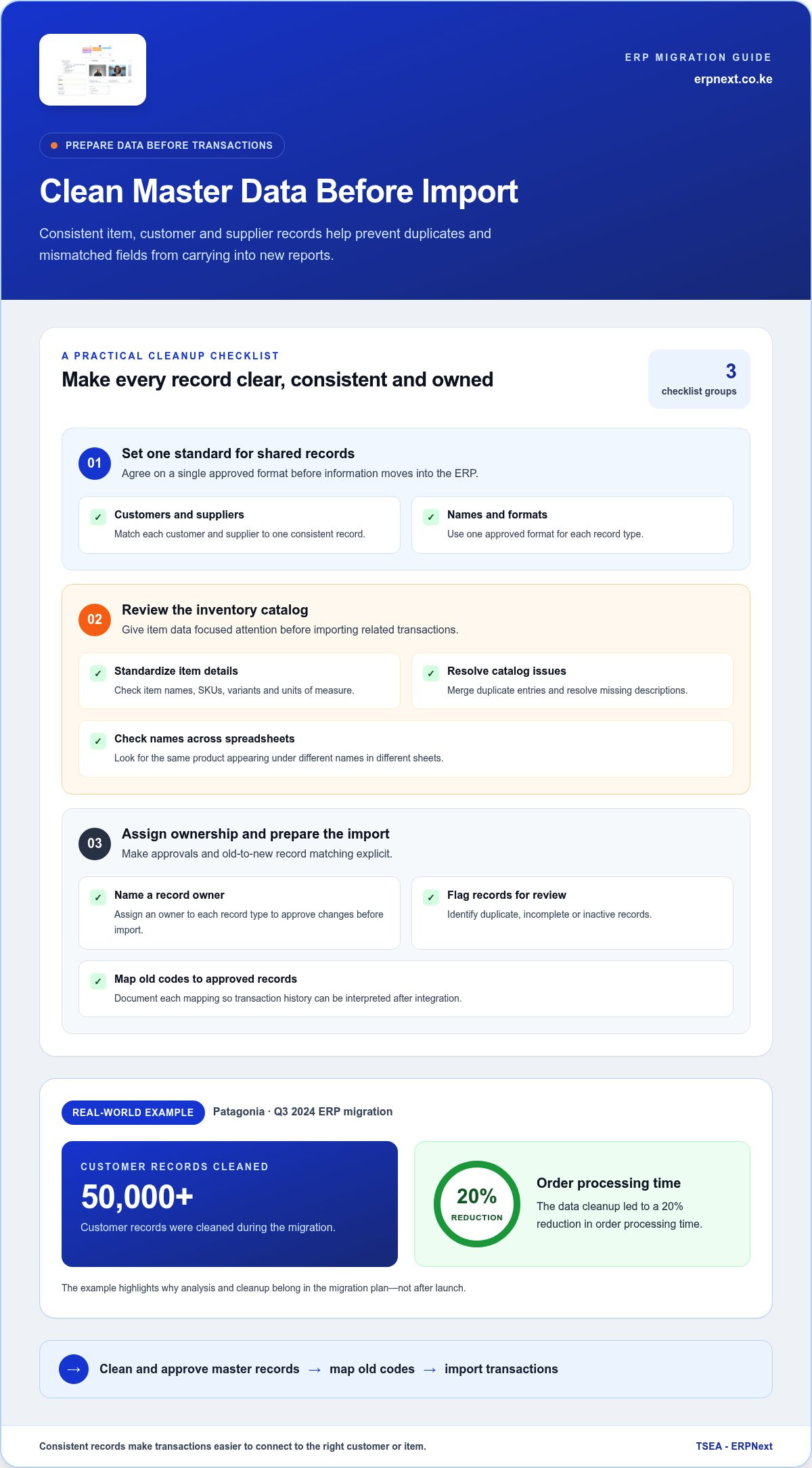
Master data is the information used repeatedly across business processes, such as item codes, customer details, supplier records and units of measure. Clean it before transactions move, or duplicates and mismatched fields can carry into new reports. Start by assigning an owner to each record type and agreeing on one approved format.
For inventory, the inventory lead should own item-list cleanup and migration. Review each SKU, variant and unit, merge duplicate entries and resolve missing descriptions. Check whether the same product appears under different names across sheets. Document how each old code maps to its approved record so transaction history can be interpreted after integration.
- Match each customer and supplier to one consistent record.
- Standardize item names, SKUs, variants and units of measure.
- Flag duplicate, incomplete or inactive records for review.
- Assign an owner to approve changes before import.
Patagonia cleaned over 50,000 customer records during its Q3 2024 ERP migration. Its data cleanup led to a 20% reduction in order processing time. The example shows why analysis and cleanup belong in the migration plan, not after launch. Consistent records help teams connect transactions to the right customer or item.
Separate master records from open transactions. Purchase orders represent outstanding supplier commitments, so migrate and reconcile them. Carry open sales orders and reservations with the order flow. For warehouse stock, record quantities by location and status. Reconcile these counts at the transition rather than combining stock that is available, damaged or reserved.
Set a clear cutoff and one source of truth for handing over transactions. Test a sample import, then compare source sheets with ERP records for missing fields, duplicates and mismatched units. Resolve exceptions before importing the full dataset. This gives teams a cleaner starting point and makes later reports more dependable.
Comparison of ERP alternatives for replacing spreadsheet workflows
For Kenyan businesses, choose cloud ERP or on-premises ERP according to access, hosting control and operational needs. Cloud suits teams needing shared access across locations; on-premises suits businesses prioritising control over their hosting environment.
To assess KES support, test sample transactions, invoices and financial reports in Kenyan shillings. Popularity alone doesn’t show whether a system handles your required currency workflows. Compare platforms against the same KES examples and reporting requirements.
Start with the workbooks you want to replace. A spreadsheet may still suit one-off analysis, while recurring stock updates or order tracking need consistent records. ERPNext can bring business functions together through modules including Manufacturing, Inventory Management, Sales, Purchases and Accounting, giving connected teams shared workflows instead of separate sheets.
Other tools can suit narrower needs. Manufacturing execution systems automate production tracking and can integrate machine data, but may require ERP or analytics integration. Industrial IoT tools connect machines and sensors to monitor uptime, utilisation and maintenance signals. They can provide useful production visibility, but staff may still need to record quality issues and exceptions. Neither tool alone necessarily replaces the broader workflows and records managed through ERP.
Compare alternatives with identical workflow tests. Use sample purchase, stock movement, sales order and production update scenarios. Then assess integration needs, support commitments and project scope. Check which tool gives staff the clearest view of order status, inventory and financial records. Spreadsheets preserve flexibility, specialist tools address specific tasks, and ERP connects core processes.
Keep Excel for analysis that doesn’t need to update shared operational records. Choose ERP when linked workflows require consistent tracking across teams. For a practical comparison of ERP workflow options, assess how each system handles your actual processes and KES reporting needs.
TSEA - ERPNext: ERPNext
TSEA offers ERPNext, a cloud-based ERP for businesses ready to bring spreadsheet-led operations into a shared system. It’s a relevant next step when teams need connected business processes rather than separate workbooks maintained by different departments.
Use your readiness findings to shape the conversation: identify which workflows need to move first, what records must be cleaned, and how staff will adopt the new system. Businesses in pharmacy or hospitality can also explore the relevant Pharmacy Chain Management or Hospitality offering. The right scope depends on the processes you want to manage and the role Excel should retain for analysis.
Contact TSEA to discuss how ERPNext can fit your business workflows and plan a practical next step.
Make Your Next Workflow Decision Count
Start with one recurring workflow where shared, reliable information would make daily work clearer. Map who uses that information, which decisions depend on it and where Excel remains useful for flexible analysis. This gives your team a practical basis for deciding how to replace spreadsheets with ERP without treating every workbook as a problem to eliminate.
TSEA - ERPNext offers ERPNext, with Pharmacy Chain Management and Hospitality options for businesses in those sectors. Share the workflow you want to improve and the outcome your team needs. Contact TSEA - ERPNext about ERP to discuss a suitable next step.
Build around a clear business priority, progressing one connected workflow at a time.
Frequently Asked Questions
Does Excel Still Have a Place?
Yes, Excel remains useful for personal analysis, quick calculations and temporary planning. A sales manager might model a proposed discount in a separate sheet before discussing it with the team. Keep that analysis distinct from approved prices, stock balances and customer orders. When colleagues rely on a workbook to record or approve shared transactions, move that process into a controlled system.
What Is ERP?
ERP is software that connects core business operations through shared records and workflows. For example, entering a supplier purchase can update purchasing and inventory records rather than requiring separate changes across files. Finance, sales and operations can then work from related information. The specific functions depend on the system and its configuration, so assess it against employees’ daily tasks.
What is the difference between Excel and ERP?
Excel is a spreadsheet tool for organising information, formulas and analysis in workbooks. ERP software manages business records through connected processes, such as sales, purchasing and inventory. A formula change or copied row in Excel can affect an individual file; an ERP workflow can apply shared rules and permissions. Use each for its strength: flexible analysis versus coordinated operations.
What makes an ERP system better than Excel for managing inventory in manufacturing?
ERP can connect materials, production requirements and stock records, helping manufacturers see how inventory relates to planned work. A bill of materials identifies the components needed for a product, while material planning links requirements with purchasing. Excel can model these details, but maintaining several linked versions makes coordinated updates harder. Assess whether the system supports your actual production workflow.
When should an SME start using ERP?
An SME should consider ERP when core work depends on information being updated across departments and staff struggle to keep records aligned. A practical signal is that purchasing or customer commitments require repeated calls to reconcile different files. Before choosing, identify the process owner, agree on which records employees will maintain and set a clear business outcome, such as fewer order-status disputes.
Which ERP Is Right for SMEs in Kenya?
The right ERP for a Kenyan SME depends on its workflows, integrations and reporting needs. Compare systems using local examples, such as a customer sale, supplier purchase and inventory movement recorded in KES. Check that the platform’s features match daily operations and that teams can use its reports to make decisions. ERPNext is one option to evaluate against those requirements.


