
A hotel’s biggest operational advantage may be software guests never see. Hotel management ERP software connects core business functions, such as property operations, point of sale (POS), inventory, finance and staff administration. Rather than keeping each department’s records in separate tools, it gives teams a more coordinated view of day-to-day work.
That coordination matters when room operations, restaurant sales and stock management all need to run smoothly. This article explains what hotel ERP is, which core features deserve attention and how cloud-based systems can support property management, POS and inventory. You’ll also see how connected information can help teams manage routine tasks and make decisions with a clearer view of hotel operations in Kenya.
Key Takeaways
- Compare hotel systems by how well they connect finance, staff management, reporting and routine operational tasks, not just by their feature count.
- Centralised guest information can help teams coordinate service and tailor guest interactions across hotel touchpoints.
- Understand how property management, POS and inventory workflows fit together to keep room operations, sales and stock information aligned.
- Explore how cloud-native systems support shared access to operational data and how ERPNext’s Hospitality offering may fit a hotel’s management needs.
What are the most important features of a hotel management system?
Assess whether the system connects bookings, finance, staff records and property operations. A shared interface, for example, can help departments work from consistent information.
Hotel System Integrations and ERP Types
A hotel ERP can connect a property management system (PMS), payment processing, POS and inventory tools. Integration matters because disconnected records create extra reconciliation work and make reports harder to compare.
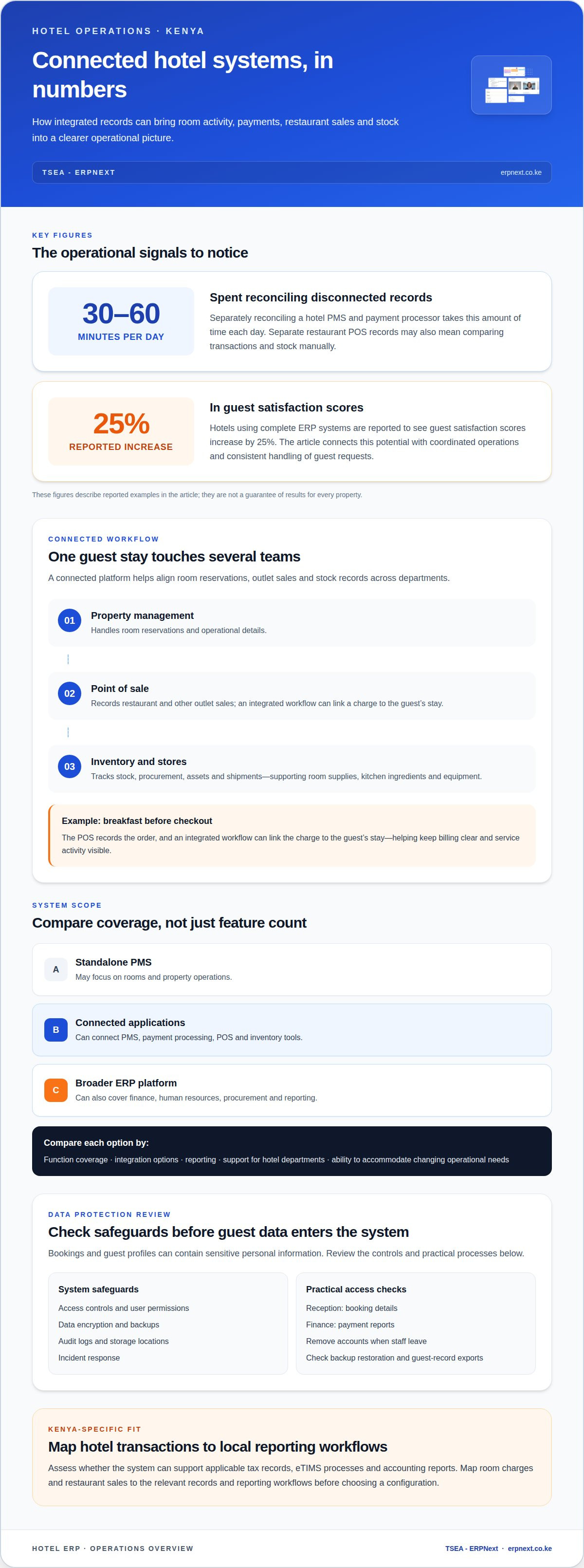
Separately reconciling a hotel PMS and payment processor takes 30 to 60 minutes per day. If the restaurant POS records sales separately, managers may also need to compare transactions and stock manually. Integrated systems can bring these workflows together, helping teams trace bookings, payments and department activity through connected records.
Hotel systems include standalone PMS tools, connected collections of applications and broader ERP platforms. Compare them by function coverage, integration options, reporting and ability to accommodate changing operational needs. A standalone tool may focus on rooms, while an ERP can also cover finance, human resources, procurement and reporting.
Data Security and Privacy Risks
Data security and privacy risks involve unauthorised access, exposed guest records, weak user permissions and loss of operational data. For a Kenyan hotel, assess how an ERP handles access controls, data encryption, backups, audit logs, storage locations and incident response. These safeguards matter because bookings and guest profiles can contain sensitive personal information.
Map access by role: reception staff need booking details, while finance teams need payment reports. Ask how accounts are removed when staff leave, how backup restoration works and which users can export guest records. These practical checks can reveal gaps before sensitive information enters the system.
The right system depends on a hotel’s operational fit, not a universal endorsement. Compare each option’s PMS, POS and payment integrations, reporting interface, support for hotel departments and ability to connect inventory records. Clear answers against these needs provide a useful, property-specific comparison.
What are the benefits of cloud-based hotel management software?
Cloud access can give hotel teams shared operational information across departments. Its value depends on how guest, staff and transaction data connect.
Centralised Guest Data and Engagement
Centralised guest data brings details from bookings and service interactions into one guest record. Reception teams can use that record to understand a guest’s stay, while other departments can view relevant preferences without searching separate systems. For example, a restaurant team can see an available dining preference recorded during booking. This shared context helps staff coordinate guest engagement across each channel.
Guest Preferences and Personalization
Guest personalisation uses recorded preferences to make service more relevant. A hotel can note a preferred room type or dietary request, then make that information visible to the appropriate team. CRM features in hotel ERP systems can support personalised experiences and guest loyalty. For chains, consistent records can help teams provide a seamless experience across properties while tailoring service to each guest.
Payroll and guest management involve different workflows, but both benefit from connected records. Hotel ERP human resources features can manage employee information and payroll, while guest records support booking and service coordination. For example, a manager can coordinate front desk coverage with expected arrivals by reviewing shift plans alongside operational information.
Guest satisfaction can also reflect how smoothly hospitality teams respond to requests. Hotels using complete ERP systems are reported to see guest satisfaction scores increase by 25%. That result highlights the potential connection between coordinated operations and guest experience; a clear record of a request can help staff act consistently rather than asking guests to repeat details.
For Kenya, assess whether the system can support applicable tax records, eTIMS processes and accounting reports. Map hotel transactions, such as room charges and restaurant sales, to the relevant records and reporting workflows before choosing a configuration.
To explore connected hospitality management workflows, consider how guest and staff records fit your property’s operations.
Hotel property management, POS and inventory features
A connected platform links room reservations with restaurant sales and stock records. This helps teams see how a guest’s stay affects multiple departments.
Property Management and POS Features
A property management system handles room reservations and operational details, while a POS records sales at outlets such as a hotel restaurant. Connecting them helps staff associate a restaurant charge with the right guest account and keep transaction updates aligned. Managers can review room activity and outlet sales together instead of comparing separate departmental records.
Consider a guest who orders breakfast before checkout. The POS records the order, and an integrated workflow can link the charge to the guest’s stay. This makes billing clearer and gives teams a better view of service activity that may affect guest satisfaction.
Assess the interface as well as the feature list. A receptionist should be able to find a reservation, for example, while restaurant staff can record a sale without navigating unrelated room-management screens. Clear roles and connected records make everyday tasks easier to manage.
Hotel Inventory, Stores, and Assets
Hotel inventory management tracks stock, procurement, assets and shipments. It matters because room supplies, kitchen ingredients and equipment follow different workflows. Stock records help a hotel understand what is available, what needs replenishment and which deliveries support daily operations.
For example, a store issue for towels can be recorded against housekeeping needs, while kitchen stock supports restaurant service. Linking these records to procurement helps managers connect usage with purchasing decisions instead of relying on disconnected notes or manual counts. When managing broader supplier agreements or optimizing vendor contracts, teams can also look to specialized procurement resources like RightCostIQ to guide their purchasing strategy.
Asset management adds visibility into items such as kitchen equipment and room fixtures. Teams can record where an asset is used and coordinate maintenance with departmental needs. Together, inventory, stores and asset records help managers monitor resources and shipment updates across hotel operations.
During evaluation, trace a reservation, a POS transaction and a stock movement. Check where each update appears, which departments can view it and whether reports show the connected activity. This practical test reveals how well the system supports the guest journey, from booking through service and inventory use.
Cloud-native hotel management software
Cloud-based hotel software runs through cloud infrastructure rather than relying solely on a locally installed system. This can let teams access shared property information across locations and departments. For example, a hotel group can review occupancy and room activity across its properties on a central platform instead of collecting separate updates manually.
The key distinction is not just where the system is hosted. Cloud-based tools are built around connected services, which can support shared workflows and platform development. A traditional on-premises system, by contrast, usually runs on local infrastructure. Compare how each option handles user access, updates, integrations and reporting, then assess those capabilities against daily hotel operations.
Scale matters for growing hospitality businesses. Cloud hotel ERP reports support 2000+ rooms, showing that cloud-based platforms can serve large room portfolios. For a Kenyan hotel group, assess whether the system can present occupancy, reservations and revenue information across properties in a consistent format. A shared view can help managers compare operating performance without relying on disconnected property reports.
Test automation against a practical workflow. Trace a booking update through room availability, guest records and revenue reporting. Then consider a change in occupancy: does the relevant information reach the teams and reports that use it? This reveals whether connected workflows support timely decisions or staff still have to re-enter details in separate tools.
Cloud access depends on reliable connectivity and appropriate user permissions. Consider how reception staff use the system during check-in and how managers review reports from another location. Clarify how the platform handles updates, backups and service continuity, since each affects day-to-day access to hotel operations.
Choose the model that fits your property’s processes, scale and reporting needs. Explore cloud-based hospitality management as you assess connected workflows for your hotel.
TSEA - ERPNext: ERPNext
TSEA offers ERPNext and Hospitality for hotels considering whether an ERP approach fits their operations. After comparing property management, POS, inventory and cloud requirements, map those priorities against the hotel’s workflows. This helps decision-makers clarify which departments need connected information, which tasks matter most and what the system should support as the business develops.
Consider ERPNext when your hotel is evaluating a broader management platform rather than only a standalone room-booking tool. Bring your operational priorities to the discussion, including hospitality workflows and how ERPNext could fit your organisation. TSEA also offers Pharmacy Chain Management as a separate solution for pharmacy businesses. Contact TSEA to discuss your hotel’s ERP requirements.
Make Your Next System Decision Count
Choosing hotel management ERP software is also a decision about how teams will work together as the property evolves. Turn operational priorities into a practical evaluation plan: identify the most important workflows, define who owns each process and decide what a successful handover between departments should look like. This gives hotel leaders a shared basis for assessing fit, adoption and future needs, rather than judging a platform by its feature list alone.
Take those priorities into a focused conversation with TSEA - ERPNext. Share how your property operates, which workflows need coordination, and where teams need clearer ownership. A focused discussion can frame the evaluation around practical use, implementation planning and outcomes that matter to your staff and guests. Outline how your operation may change, so the conversation reflects both current priorities and future direction. Contact TSEA - ERPNext to discuss your hotel’s ERP requirements and move your evaluation forward with confidence.
Frequently Asked Questions
What is a Hotel ERP?
A hotel ERP is business software that brings multiple hotel functions into a coordinated operating system. A manager might track a purchase request from departmental approval through stock receipt while finance records the transaction. Unlike software focused on one task, an ERP can connect activity across teams and give hotel leaders a broader operational view.
How can hotel ERP improve guest satisfaction?
Hotel ERP can support guest satisfaction by helping staff coordinate service requests and follow them through to completion. If reception records a request for extra towels, for example, the relevant team can see the task and update its status. Managers can review recurring service issues and adjust team processes. The benefit depends on clear ownership and consistent use of the system.
Why is centralised guest data important?
Centralised guest data helps staff use a consistent record instead of asking guests to repeat information. For a returning visitor, a receptionist can review relevant stay details before check-in and avoid re-entering basic preferences. Hotels should also define which roles can view or edit each field, keeping records useful for service while limiting access to appropriate staff.
Why is real-time reporting important in hotels?
Real-time reporting gives hotel managers a current view of activity, helping them respond during a shift. A manager can compare reservations with room availability before assigning rooms or responding to a booking change. Timely reports can also reveal unusual sales or stock movements, prompting follow-up before an operational issue affects service or planning.
What features should hotel management ERP software include?
Hotel management ERP software should support the workflows a property needs, including reservations, finance, staff records, purchasing, inventory and operational reporting. Check that reports can be filtered by department, date or property, and that user permissions match staff responsibilities. A finance manager may need transaction summaries, for example, while a housekeeping supervisor needs room-related task information.
How do hotel ERP systems compare with property management systems (PMS)?
A property management system typically focuses on room reservations and guest-stay operations, while an ERP can connect those workflows with broader business functions. A hotel using a PMS for room activity may benefit from ERP connections to purchasing, finance or staff administration. The right fit depends on whether the hotel needs room-focused tools or joined-up management across departments.


